
Quick Answer
Can I play Spotify on my smartwatch without my phone?
Yes—many modern smartwatches let you enjoy Spotify offline, phone‑free. For the best experience, either download playlists directly to the watch with Spotify Premium, or convert your favorite tracks to MP3 using AudFun Spotify Music Converter and sync them as local music files. Just make sure your watch has built‑in storage for offline music; otherwise, it can only work as a remote control for your phone.
Smartwatches have evolved beyond being a second screen—they can now serve as your standalone music player, letting you run, ride, or commute phone‑free with your favourite Spotify tracks right on your wrist.
If you’re searching for a smartwatch that truly supports Spotify, you’re in the right place. This guide uncovers the top models for Spotify offline playback, breaks down must‑know features, and shows you a proven way to listen without a Premium subscription.
- Part 1. What Smart Watches Support Spotify
- Part 2. Before You Buy: 4 Key Features for Offline Spotify
- Part 3. Top 7 Best Smartwatches Compatible with Spotify
- Part 4. Play Spotify on Smartwatch Offline without Premium
- Part 5. Frequently Asked Questions About Spotify on Smartwatches
Part 1. What Smart Watches Work with Spotify
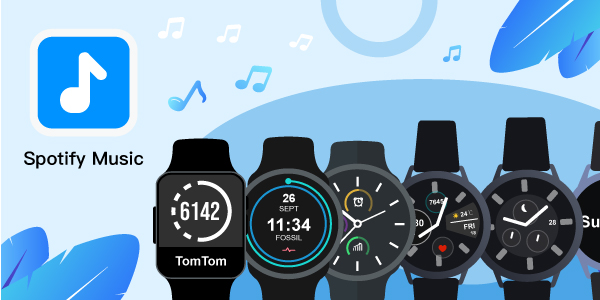
Spotify’s official smartwatch app runs on watchOS and Wear OS, supporting Apple Watch, Samsung Galaxy Watch, Garmin, Google Pixel Watch, and Fitbit. However, “working with Spotify” differs widely: some watches only act as a phone remote, while others let you download playlists for phone‑free listening. Modern Garmin (Venu 3, Forerunner), the latest Apple Watch, and newer Wear OS watches (Galaxy Watch6, Pixel Watch 2) emphasize offline storage and standalone playback. Key specs like storage, offline support, and battery life under music + GPS vary even within the same brand—choosing the right model matters much more than the logo.
- Samsung Galaxy/Gear Watch: Many Samsung smartwatches support streaming the Spotify soundtracks precisely. The Galaxy versions of the Samsung watch play the Spotify playlists flawlessly.
- Apple Watch series
- Fitbit Versa
- Garmin Watch
- Fossil Gen Watch
- Google Pixel Watch
Part 2. Before You Buy: 4 Key Features for Offline Spotify
Spotify playback on a smartwatch is not one‑size‑fits‑all. Check these four elements to avoid buying a simple remote control.
1. Built‑In Storage Capacity
Your watch needs dedicated space for music. A single high‑quality MP3 (320 kbps) takes about 2.4 MB per minute. Garmin watches frequently offer 4–8 GB of music storage; an Apple Watch Series 9 provides up to 8 GB for songs. Many Wear OS watches share a small pool with the OS, so verify the user‑available music storage, not just the total spec.
2. True Offline Playback vs. Phone‑Remote Control
Some budget watches can only pause, skip, and adjust the volume of Spotify playing on your paired phone. Others store music locally and connect directly to Bluetooth headphones. Insist on “offline playback” or “music storage” in the product specs before buying.
3. GPS + Music Battery‑Life Estimates
Playing local files while tracking with GPS is the most demanding scenario. A Garmin Venu 3 can last about 11 hours with GPS and music; an Apple Watch Series 9 manages roughly 7 hours. Look for explicitly published GPS + music runtime numbers.
4. Local File Sync Compatibility
Spotify’s official offline feature requires a Premium subscription and periodic re‑sync. To get permanent, subscription‑free access, convert Spotify songs to DRM‑free MP3s with AudFun Spotify Music Converter and side‑load them onto your watch. Confirm that your chosen watch accepts local music file transfers; then you own your playlist forever.
Part 3. Top 6 Best Smartwatches with Spotify
In this section, you will be learning about 6 smartwatches that play Spotify music to your preferences. Here are some insights on the best smartwatches with Spotify offline and online playback support.
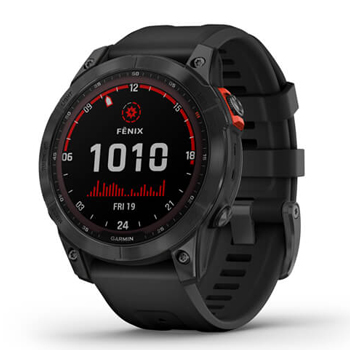
1. Garmin Fenix 7
This Garmin Fenix Watch connects with Spotify, iHeartRadio, and Deezer applications. The cost varies with the type of display you choose. The AMOLED type display costs nearly $899. Garmin Fenix 7 model allows you to play soundtracks for more than 10 hours and it keeps with the GPS tracking as well. The latest models of this smartwatch come with solar editions that boost the battery life making it stay active for a few more hours than the older versions.
🏷️Price:
The cost ranges from $599.99 to $699.
✔️Pros:
- Can store nearly 1000 songs for offline listening
- Connects with Amazon, Spotify, Deezer and iHeartRadio
- Remains active even if you play soundtracks for 10 hours
❌Cons:
- It is an expensive smartwatch and the solar edition models require extra care
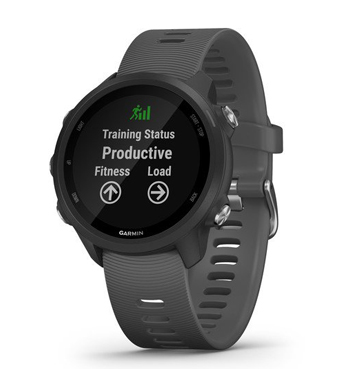
2. Garmin Forerunner 245 Music
This Garmin Forerunner 245 Music smartwatch supports Spotify and stores more than 500 songs for offline listening. Spotify Premium users can try downloading their favorite playlists from Spotify to enjoy offline listening of their desired songs.
You can play the soundtracks for 6 hours along with GPS enabled. It is enough if you drag and drop the songs in its media interface to play them. It is also integrated with running features to count your footsteps during your workouts.
🏷️Price:
The cost of this smartwatch is $349.
✔️Pros:
- Supports many music applications like iHeartRadio, Deezer, and Spotify
- Synchronize your watch with Spotify for offline listening supported by premium users
❌Cons:
- This model does not look trendy and is a little expensive too
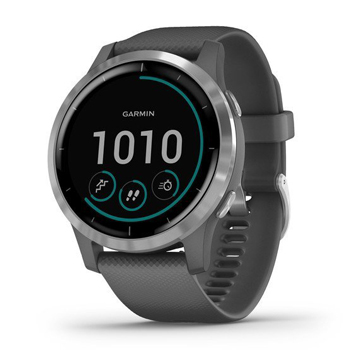
3. Garmin Vivoactive
Garmin Vivoactive is well-designed to support a wide range of sports activities like cycling, swimming, golf, and indoor workouts. The sports tracking feature assists the users in monitoring their health progress and making respective changes to their workouts based on the results.
🏷️Price:
The price tag is $279.99 to $349.99.
✔️Pros:
- Stores nearly 500 songs
- Supports Spotify, Amazon Music, Deezer, iHeartRadio applications
- You can play 5 hours of music
❌Cons:
- The controls are complex and newbie users take some time to follow up
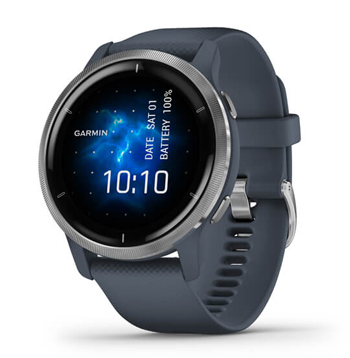
4. Garmin Venu 2
Play the songs for eight hours along with the GPS features and connect with Spotify, Amazon Music, Deezer, and iHeartRadio apps. There are different modes for tracking your sports activities. It has customizable screens with round and square versions of the display.
🏷️Price:
$349.99 to $399
✔️Pros:
- Stores nearly 2000 songs for offline listening
- Connects with Spotify, Deezer, Amazon Music and iHeartRadio
- Stream the songs for 8 hours with GPS
❌Cons:
- It is less attractive when compared to other models
5. Apple Watch Series
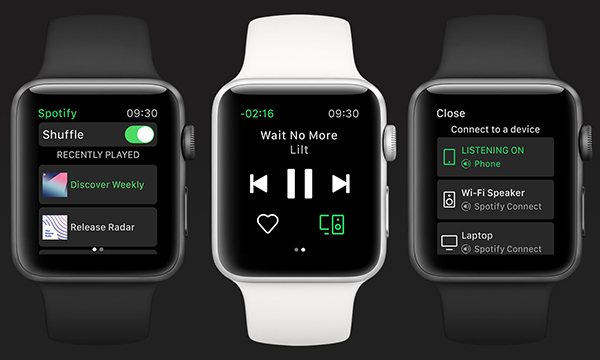
Most of the Apple Watch series support the streaming of Spotify songs. It has customizable screens and is best used as a workout measuring device. By connecting with the Wi-Fi, allow your smartwatch to communicate with the Spotify app. You can store songs and play them during the workouts. You can also measure the optical heart rate and monitor it whenever required.
🏷️Price:
The price tags for Apple series smartwatches are from $199 to $279.
✔️Pros:
- Uninterrupted streaming of Spotify playlists on this smartwatch
- Come with a cheap price
❌Cons:
- Only supports 3 hours of music playback
6. Samsung Galaxy Series
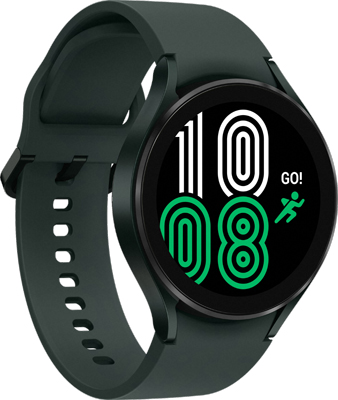
The Samsung Galaxy smartwatch series is specially designed for fitness and it is accompanied by supporting music tracks. Access the Spotify playlists while performing your workouts. You can find this smartwatch in various sizes and choose it as per your desires. It also offers offline support for Spotify Premium users.
🏷️Price:
The price ranges from $249 to high value based on its advanced versions.
✔️Pros:
- This smartwatch provides you with 16GB of storage space
- You can synchronize the songs in an offline mode
❌Cons:
- Difficulty in selecting the smartwatch because there are many models of different sizes
7. Fossil Gen 6
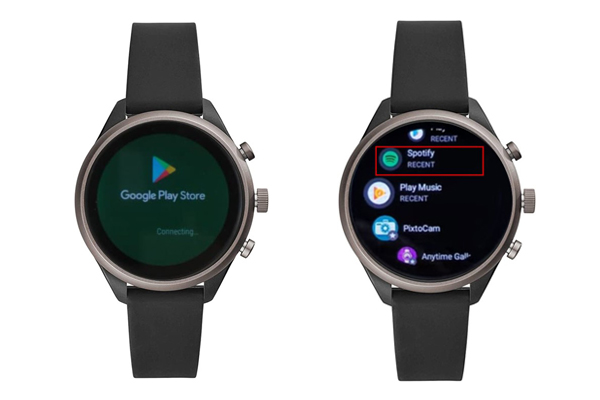
The Fossil Gen 6 typically runs on Google’s Wear OS and offers robust features such as fitness tracking, notifications, music playback, and more. The Fossil smartwatch comes with a Spotify and YouTube Music app built-in, allowing you to play, pause, skip tracks, and adjust the volume of the music directly from your wrist.
Also, this Bluetooth-support wrist allows you to cast music from the Spotify mobile or desktop app into it through Bluetooth connectivity. However, please note that you can only listen to music on the Spotify watch app for Fossil Gen 6 with a paid Spotify Premium subscription.
🏷️Price:
The price for a Fossil smartwatch at both Amazon and Fossil is $299
✔️Pros:
- Run with Wear OS from Google, which is compatible with latest versions of Android and iOS
- With improved and more reliable Bluetooth connectivity at up to 4X range
- Touchscreen smartwatch at affordable price
- Support Spotify and YouTube Music online/offline
❌Cons:
- Short battery life
- Inaccurate GPS
- Without Google Assistant support
Part 4. How to Play Spotify on Smartwatch Offline without Premium
Are you sick of the payment for Spotify Premium when you connect Spotify to smartwatches? In this section, you can find an alternative method to stream Spotify songs on smartwatches offline without Spotify Premium precisely. The AudFun Spotify Music Converter is a great tool to assist you to enjoy offline streaming of Spotify songs into your smartwatch.
This feature-rich gadget can help you get rid of the format restriction of Spotify songs and enables you to listen to Spotify offline without premium on any device or player you have. Thanks to its advanced decryption technology, it has the capability to download and export any audio from Spotify to a variety of file types such as MP3, M4A, AAC, etc. with a free Spotify account.
Beyond these, you don’t need to worry about the output quality since this software keeps 100% original metadata info including lossless quality and full track info. Besides, this all-in-one tool makes it possible and easy to download as many Spotify tracks as possible in batches at once. Afterward, you can keep those converted Spotify audio files forever without the Spotify app.
Key Features of AudFun Spotify Music Converter
- Convert Spotify audio to MP3, AAC, M4A, M4B, FLAC, and WAV
- Faster conversion speed of Spotify music
- Retain the metadata and ID3 tags of Spotify music tracks
- Allows you to get offline listening of Spotify songs on smartwatches
How to Download Songs to Use Smartwatches with Spotify Offline
In this section, you will learn how to use AudFun Spotify Music Converter to download your liked Spotify songs to MP3 on your computer for playing on watches offline. Here please follow the guidance below and learn more.
🔎Prior to that, please look into the following notices:
- When adding files, please don’t get the Spotify app closed.
- When converting files, please never unpair the audio output device (like a microphone) from your computer.
Step 1 Transfer your music collection from Spotify to AudFun
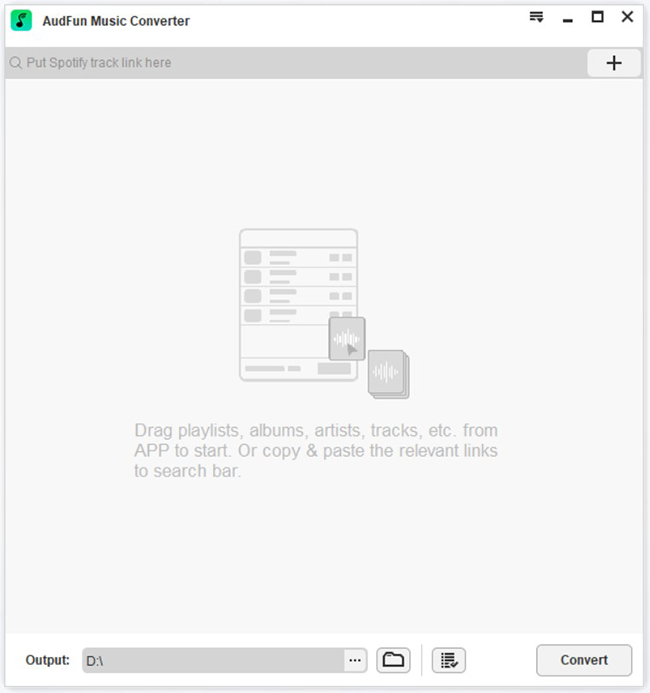
When you open the AudFun program, the Spotify app will launch automatically. You can opt to drag & drop the track, playlist, album, podcast, or audiobook from the Spotify app into the screen of AudFun. Or, select ‘…‘ > ‘Share‘ > ‘Copy Spotify Link‘ and then paste the copied URL links to the converter’s address bar, after which, press the Add button to load those audio files.
Step 2 Reset the audio format for Spotify music on smartwatches
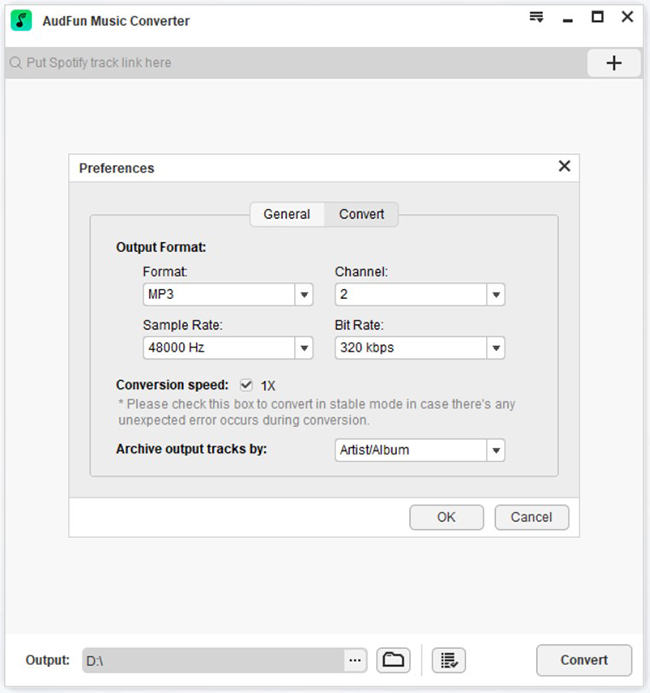
Choose the ‘Preferences‘ option after clicking the Menu bar on the top side. On the pop-up preferences window, go to the ‘Convert‘ pane, in which you can pick the output file format as MP3 or others and edit the bit rate, sample rate, etc. Finally, click the ‘OK‘ button to save the changes.
Step 3 Convert songs from Spotify for smartwatches
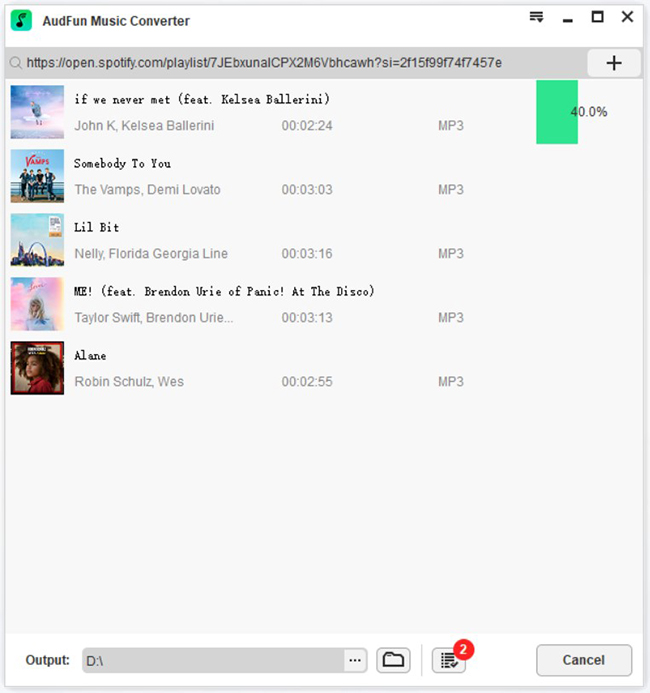
Press the Convert button to start to convert and download Spotify songs. You must wait for a few minutes until the conversion process completes. Once done, the downloaded Spotify music tracks can be found by clicking the Converted button at the bottom. Then you can move them to smartwatches via a USB or the fitted Watch app to enjoy Spotify music offline.
Part 5. Frequently Asked Questions About Spotify on Smartwatches
1. Can I listen to Spotify on my smartwatch without my phone?
Yes—most modern smartwatches can play Spotify directly to Bluetooth headphones. Spotify Premium is required for official offline downloads; alternatively, convert tracks with AudFun Spotify Music Converter to load MP3s and go phone‑free.
2. Do I need Spotify Premium for offline playback on a smartwatch?
Officially, yes. Without Premium, you rely on Wi‑Fi or a phone. But thousands of runners use AudFun Spotify Music Converter to create permanent MP3 files and enjoy unlimited offline listening without a subscription.
3. How many songs can I store on a smartwatch?
It varies. Apple Watch reserves up to 8 GB for music (~1,600 songs at 256 kbps), Garmin Forerunner 255 offers about 3.5 GB (~700 songs), and most Wear OS watches provide several gigabytes. Compact MP3 files from AudFun let you maximize capacity.
4. Can I transfer my own MP3 files to a smartwatch?
Absolutely. Apple Watch syncs via the Watch app’s “Music” section, Wear OS watches via “Manage Music,” and Garmin watches with Garmin Express. Once you’ve converted Spotify songs to MP3, sideload them like any local track.
5. Will Spotify work without an internet connection on a watch?
Only if tracks were downloaded in advance with a Premium account—and those downloads can expire. MP3s created with AudFun Spotify Music Converter never need connectivity, never expire, and play flawlessly offline anywhere.
Conclusion
You now have a curated list of modern smartwatches that let you enjoy Spotify music directly from your wrist—and a proven way to listen to any Spotify track offline without a Premium subscription. Instead of tethering your playlist to a monthly payment or dealing with the 30‑day cache limit, use AudFun Spotify Music Converter to create permanent, portable MP3 files. Once saved as standard music files, they play on virtually every smartwatch and platform without compatibility headaches.