
Spotify is a leading music streaming platform with over 80 million songs ready to be played on your device. While Spotify makes it incredibly easy to find and share your favorite tracks, albums, and artists, it has strict limitations when it comes to offline playback. You cannot download Spotify songs as local files to play outside of the official app.
If you are trying to share specific tracks or download them, you might have come across the term Spotify URI/URL. While a URI is great for sharing, it doesn’t solve the offline listening problem by itself. To enjoy your favorite melodies on any device—like an MP3 player, smartwatch, or USB drive—you need to learn how to convert Spotify URI to MP3. In this guide, we will explain exactly what a URI is, how to find the hidden URI code, and the best ways to convert it into a playable MP3 file.
- Part 1. What Is Spotify URI
- Part 2. How to Get Spotify URI
- Part 3. How to Convert Spotify URI to MP3
- Part 4. Convert Spotify URI to MP3 Free Online
- Part 5. In Conclusion
Part 1. What Is a Spotify URI?
URI stands for Uniform Resource Indicator. In the context of Spotify, a URI is a unique string of characters used to identify a specific resource on the platform, such as a track, album, artist, or playlist.
Spotify URI vs. URL: While a standard Spotify URL (web link) will open the music in your web browser, a Spotify URI is designed to open the exact track directly inside the Spotify desktop or mobile application. It acts as a direct command to the app, making it highly efficient for sharing specific music seamlessly.
Part 2. How to Get Spotify URI?
Spotify recently updated its interface, making the URI slightly harder to find. Here is the up-to-date method to locate the Spotify URI on both your computer and smartphone.
On a Computer (Windows & Mac)
To locate Spotify URI on your computer, you need to follow the following steps:
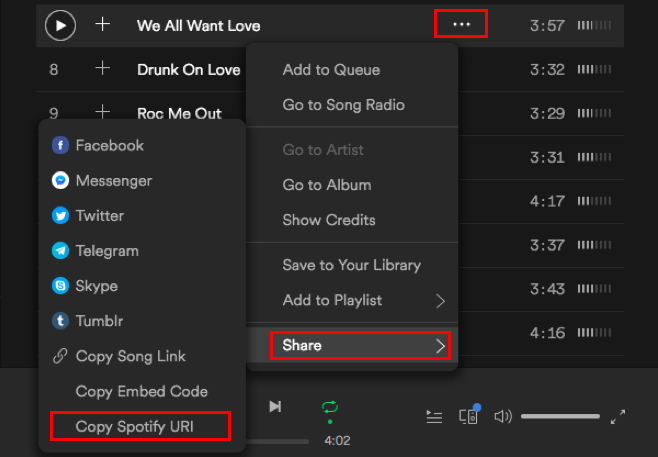
Step 1. Launch Spotify and find the album, song, playlist, etc.
Step 2. Once you find the song, you need to click on the three dots.
Step 3. A small-pop up will appear, and towards the bottom, you will see the Share option. Please click on that, and another window will appear with the Copy Spotify URI option.
Step 4. Click on the Copy Spotify URI option to find the Spotify URI.
On Smartphones (iOS & Android)
On mobile devices, Spotify uses a visual “Spotify Code” rather than a text-based URI string. Here is how to find it:
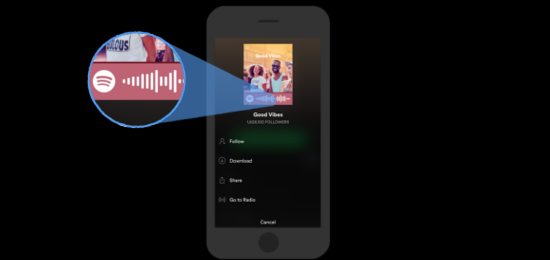
Step 1. Launch Spotify and select a song.
Step 2. Click on the three dots, and you will see the Spotify URI code.
Step 3. You will see the Spotify URI code. Take a screenshot and share it with people so that they can locate the exact song.
Now, let’s find out how to use Spotify URI. After finding Spotify URI, you can copy it and paste it into any web browser’s search box. Next, you will be asked to launch Spotify; once you do, you will be taken to the exact track, artist, or album.
Part 3. How to Convert Spotify URI to MP3
To convert Spotify URI to MP3, you will need Spotify URI to MP3 converter. And the recommended converter to use is AudFun Spotify Music Converter. Since Spotify doesn’t allow you to download the songs directly since they are protected, you will have to use a Spotify music converter to do that.
AudFun Spotify Music Converter is one of the best Spotify music converters and is easy to use. It will let you easily convert the songs to MP3 and other audio formats. Moreover, AudFun Spotify Music Converter will retain the ID3 tags. So, all you need to do is download AudFun Spotify Music Converter on your computer and start using it.
Using AudFun Spotify Music Converter is easy and you don’t need any technical knowledge to start using it. Moreover, there are just a few steps that you need to follow to start using AudFun Spotify Music Converter. The Spotify music converter is available for Mac users and Windows users.
Key Features of AudFun Spotify Music Converter
- You can download unlimited Spotify songs and listen to them offline.
- The songs can be converted into different formats, such as MP3, WAV, FLAC, etc.
- Songs will retain their ID3 and lossless audio quality.
- The songs will be converted at 5X speed.
How to Use AudFun Spotify Music Converter to Convert Spotify URI to MP3
Step 1 Download and launch AudFun Spotify Music Converter
First, visit the official website of AudFun Spotify Music Converter and download the software. Then install it, and finally launch the tool.
Step 2 Upload Spotify URI to AudFun
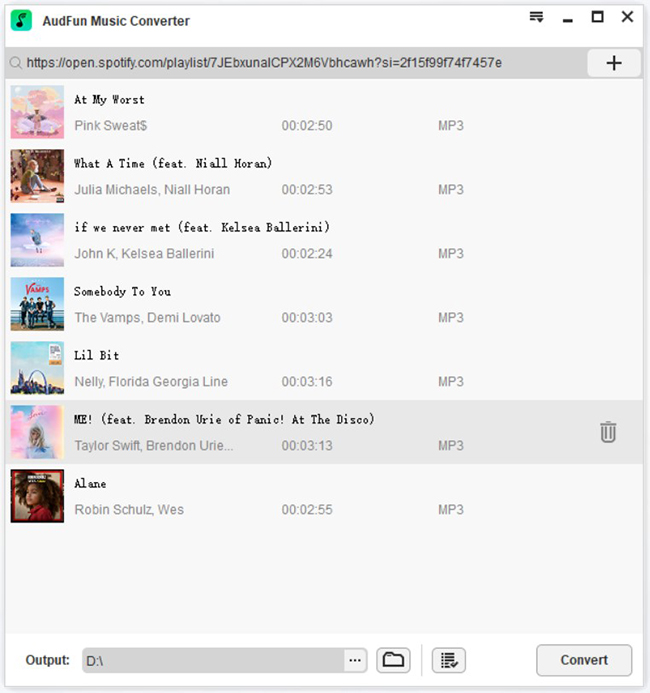
Now, add the Spotify songs to AudFun Spotify Music Converter. You can drag and drop if there are multiple Spotify songs; else, click on Spotify and click on the Share option. Then, copy it and paste it to the search box on Spotify.
Step 3 Customize the audio parameters and convert Spotify URI to MP3
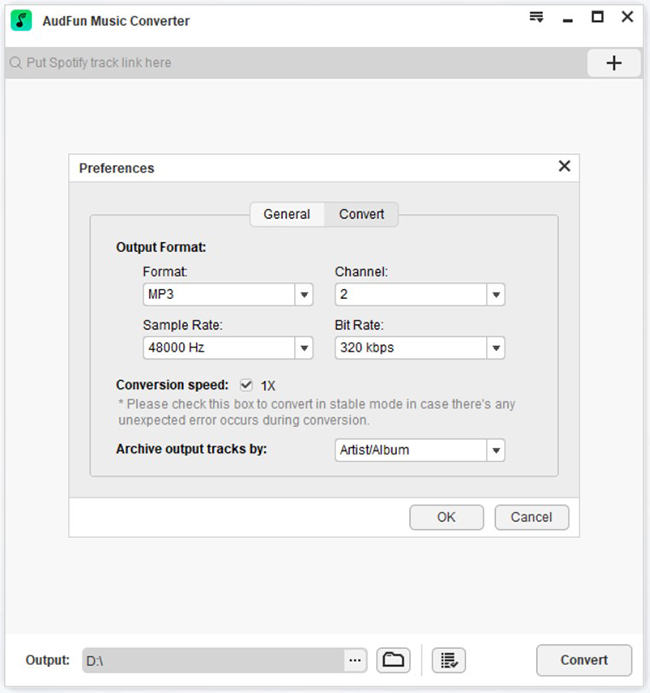
You can change the audio output format of the songs to MP3, WAV, FLAC, etc., and customize other parameters, such as bit rate, sample rate, and channel. Finally, click on the convert option. The songs will be saved to the destination folder. Now, you can play the songs on any device and listen to them whenever you want.
Part 4. How to Convert Spotify URI to MP3 Free Online
If you want to convert Spotify URI to MP3 free, try SpotiApp. This is an online music converter, which can help you convert Spotify songs seamlessly. And since it’s an online tool, you don’t need to download it. You can simply visit the website and follow the instructions, and Spotify songs will be downloaded conveniently. The songs will be download in MP3 format, though. It’s free, which means you can start downloading your favorite Spotify songs today.
How to Use SpotiApp to Convert Spotify URI to MP3 Online
Step 1. Visit the SpotMate Spotify URI to MP3 converter online free website.
Step 2. The search bar will be on the top. Go to Spotify and copy Spotify URI.
Step 3. Paste the Spotify URI and hit the download option.
The song will be downloaded within no time, and you can transfer it to any device to listen offline. However, you can’t customize audio parameters in SpotiApp. And the only format the songs will be downloaded in is MP3.
Part 5. In Conclusion
A Spotify URI is a powerful tool for sharing your favorite music and directing users straight to the Spotify app. However, to truly own your music and listen offline on any device, converting that URI into a universal audio file is necessary.
While free online tools exist for quick, one-off downloads, they often compromise on audio quality. For the best listening experience, we highly recommend using the AudFun Spotify Music Converter. It is the most reliable Spotify URI to MP3 converter, ensuring you get fast downloads, lossless audio quality, and perfectly organized ID3 tags.