Quick Answer
- Core Functionality: NoteBurner Spotify Music Converter downloads and converts Spotify tracks to common audio formats like MP3, AAC, FLAC, and WAV at up to 10X speed, complete with a built-in CD burner and ID3 tag editor.
- The Trade-Off: While versatile, NoteBurner carries a steep price tag—particularly for its lifetime license ($129)—and occasional audio compression can affect high-fidelity listening.
- The Best Alternative: A dedicated third-party audio converter that focuses on 1:1 lossless audio extraction, stable 5X batch conversion, and budget-friendly pricing provides a more practical solution for offline listening.
Spotify music is the bomb when it comes to a wide array of quality music, videos, and podcast. It is free, with over 82 million tracks for grabs. Even though Spotify Free users get distractions from adverts, they still enjoy Weekly Discovery, Listening History, and following artists, among others. But some things go beyond the free version, like improving streaming quality and access to ad-free songs. Well, the Premium version can take care of that. However, you will still need an internet connection to pull your hits through.
The Free version of Spotify has limits of using, while the premium user needs to connect to your network to stream music. Even with the offline mode feature, you’re still stuck in playing music offline out of the Spotify app. So can you break the shackles of the Internet and get Spotify songs offline anywhere? Not anymore with the like of NoteBurner Spotify Music Converter and other Spotify playlist downloader. They help you download songs from Spotify to the formats like MP3, FLAC, and others that can be compatible with many devices and access them without the Internet. See the review of NoteBurner and which alternative you can choose!
- Part 1. NoteBurner Spotify Music Converter Review
- Part 2. Best Alternative to NoteBurner Spotify Music Converter
- Part 3. AudFun vs NoteBurner: Which Is Better
- Part 4. Conclusion
Part 1. NoteBurner Spotify Music Converter Review
What values does the NoteBurner converter bring to the table and why would you look for its alternative? This NoteBurner Spotify Music Converter review unfolds more.
What Is NoteBurner Spotify Music Converter
NoteBurner Spotify Music Converter is a conversion app that removes restrictions from Spotify files. This then opens ways for you to stream your Spotify music on any device in common formats. It supports formats like AIFF, WAV, MP3, AAC, etc. It works at a high speed of X10 rate, offering you lossless quality. Furthermore, it splashes you with free built-in tools of the audio converter and ID3 tags editor to turn your video into a polished piece.
NoteBurner Spotify Music Converter Key Features
- Supports the burning of your converted Spotify playlists to CD directly without installing any CD burner
- Keeps the originality of your Spotify music and preserves ID3 tags like album, track number, artwork, etc.
- This app also supports converting normal audio files to common formats like AIFF, OGG, FLAC, MP3, etc.
- It works at up to 10X faster conversion speed to download Spotify playlists or albums
How to Use NoteBurner Spotify Music Converter
You get NoteBurner Spotify Music Converter for Windows as well as Mac versions. Just visit the official website page and download your preferred version. Next, follow the below steps to convert and download your Spotify music.
Step 1. Launch NoteBurner and log into your account
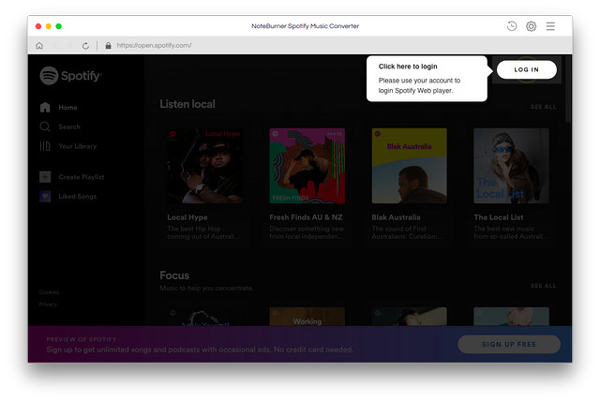
Once you have installed the NoteBurner app, just launch it on your Mac or Windows computer, and then log into your Spotify account.
Step 2. Customize the parameters on NoteBurner app
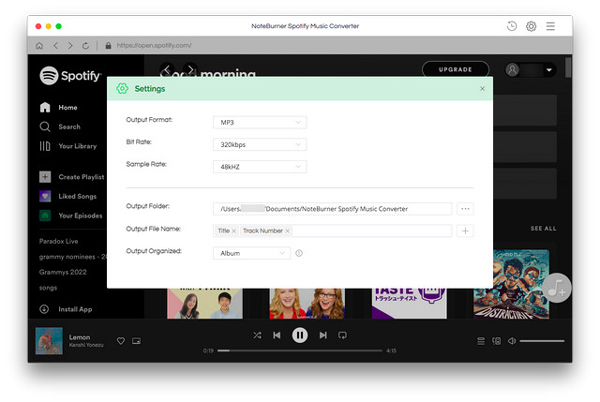
With this app, you can set the output parameters and other settings as you wish. Go to the “Gear” button and choose the output format you prefer. Also, set the output quality and path.
Step 3. Add Spotify songs to NoteBurner
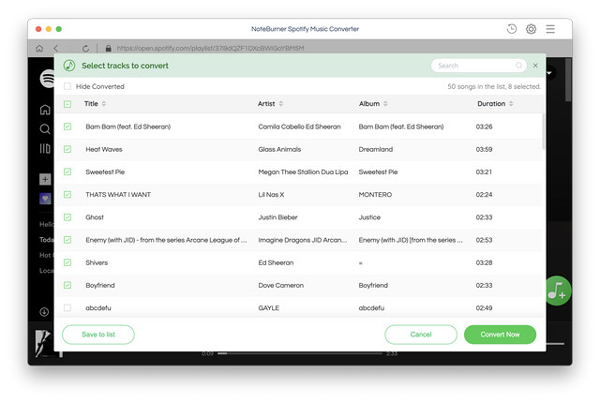
Next, open the Spotify playlist that you want to convert then click on the “+” button to add them to the interface.
Step 4. Convert and download Spotify songs
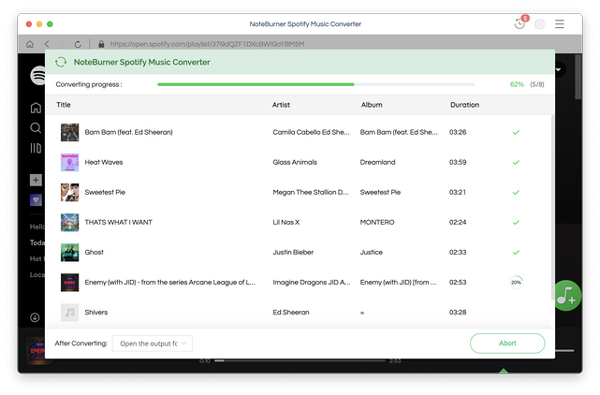
Confirm the songs you added and then hit on the “Convert Now” to let the app start the conversion process. Finally, check in the output folder to locate the converted Spotify songs then transfer them to any device for playback.
Is NoteBurner Spotify Music Converter Legal and Safe
NoteBurner is dully safe to download from its official website. Use it to download and convert your Spotify music to any common output format. It doesn’t contain any malware or viruses that cause risk to your files. The free version has limited features but you can upgrade to enjoy the advanced features.
Pros and Cons of NoteBurner Spotify Music Converter
Pros
- Easily converts Spotify songs to popular formats like WAV, ALAC, MP3, AAC, etc.
- It keeps ID3 tags after the conversion
- It can burn Spotify music to CD in a single click
- Compatibility with the latest Windows and Mac devices is guaranteed
Cons
- It is a bit expensive to users as compared to its peers
- It doesn’t support downloading all songs from Spotify
- Doesn’t match all songs with the Spotify library
- The free version has limited features
- You’ll experience a loss of quality of the converted Spotify files as compared to the original
Part 2. Best Alternative to NoteBurner Spotify Music Converter
NoteBurner Spotify Converter isn’t all that rosy as you’ll experience a few hitches along the way. It doesn’t support the downloading of all Spotify songs and won’t give you the originality of the Spotify songs. For that, we settle on the NoteBurner Spotify Music Converter alternative, AudFun Spotify Music Converter.
AudFun is encompassed with the latest technology to quickly convert and download Spotify tracks at a 5X speed rate. It also works carefully to give you the originality of your Spotify songs by saving 100% original ID3 tags. These include the artist, composer, and title, among others.
You also don’t need to worry about offline playback. It supports common output formats which are directly played on multiple devices and players. These include formats such as MP3, FLAC, WAV, and M4A, among others. Likewise, you get the privilege to customize output parameters such as channel, bit rate, sample rate, and speed.
AudFun Spotify Music Converter
- Preserves 100% lossless output Spotify audio files
- Supports the conversion of Spotify music files at a high speed of X5 rate
- Listen to Spotify offline without premium on multiple devices and platforms
- Converts Spotify music to several formats like FLAC, M4A, MP3, etc.
How to Download Music from Spotify by NoteBurner Spotify Music Converter Alternative
The step to lossless Spotify files is painless with AudFun Spotify Music Converter. This app works in a few clicks to give you a quality output format. Just visit the official website and download either Windows or Mac-supported system. Then install it on your computer while ensuring that the Spotify app has also already been installed. Likewise, you need to register and activate AudFun to the full version to remove the restriction of the first 1-minute conversion of each track.
Step 1 Import Spotify songs to the AudFun app
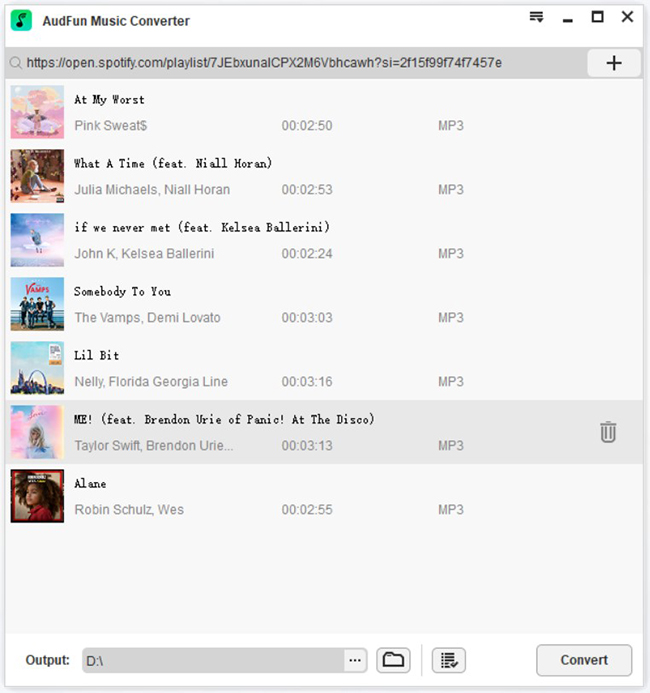
Once you launch the AudFun converter, the Spotify app will also open up immediately. Next, choose the songs you wish to convert, tap on the item and choose the “Three-dots” against it. Next, click on the “Share” tab and go to the “Copy Spotify Link” option to copy the link. Then paste the copied link into AudFun’s app address bar and tap the “+” button to load it.
Step 2 Customize the output parameters for Spotify
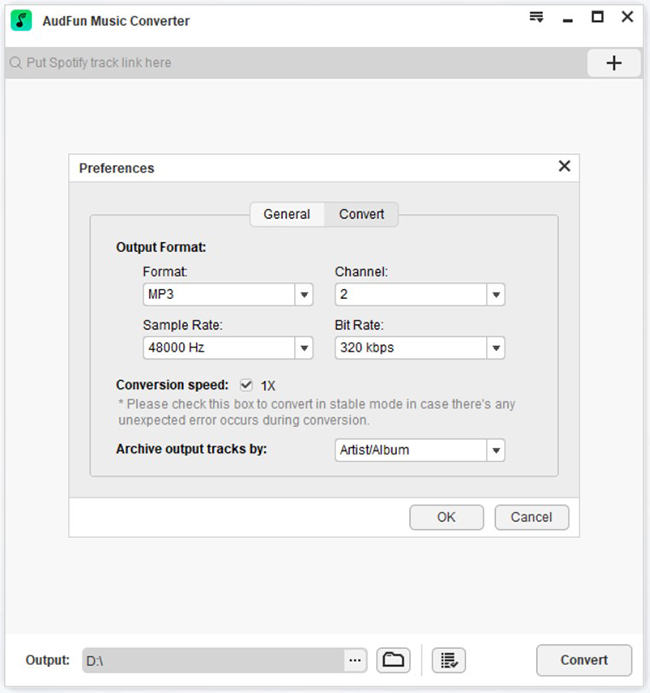
Personalize the Spotify output format and parameters to your preference. Go to the “Menu” bar and click on the “Preferences” > “Convert” options. This will open the settings window where then you can start to adjust the Spotify output format like FLAC, MP3, WAV, or M4B, among other options. Also, remember to customize the parameters like sample rate, and bit rate, among others, and classify the output tracks by artists or albums.
Step 3 Convert your Spotify song by AudFun Spotify Music Converter
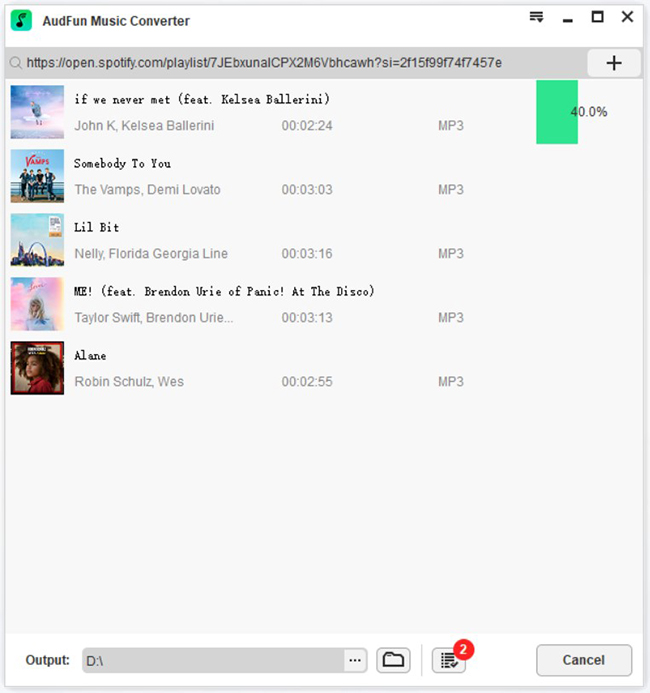
Click on the “OK” > “Convert” buttons and the system will download Spotify songs without premium and convert them to the set configurations. It will then download your songs to the target folder that you set. Finally, locate them from your computer’s local disk for personal use on any device, anytime.
Part 3. AudFun vs NoteBurner: Which Is Better
When choosing between NoteBurner and AudFun, the decision generally hinges on two factors: budget and audio fidelity.
NoteBurner includes niche extras like an integrated CD burner and a secondary video-to-audio extractor, but it charges a premium price ($129 for a lifetime license). AudFun Spotify Music Converter, on the other hand, focuses strictly on audio performance, delivering 100% lossless output fidelity, cleaner UI navigation, and substantially more budget-friendly lifetime options.
| AudFun | NoteBurner | |
| Conversion Speed | X5 rate | X10 rate |
| Free Conversion Limit | 1-minute of audio | 3 minutes of audio |
| Built-in with a Free Toolbox | No | Yes |
| Price | $14.95 monthly; $45.95 for 1 PC lifetime; $69.95 for 5 PCs lifetime | $14.95 monthly; $59.95 for a year plan; $129 for a lifetime plan |
| Free Trial | Yes | Yes |
| Keep ID3 Tags Information | Yes | Yes |
| Burn Spotify Music to CD | No | Yes |
| Supported Operating System | Windows and Mac | Windows and Mac |
| Output Audio Formats | MP3, M4B, WAV, AAC, M4A, FLAC | MP3, FLAC, ALAC, WAV, AIFF |
| Audio Quality | 100% originality | Not original |
Frequently Asked Questions
Can I convert Spotify tracks to MP3 with a Spotify Free account?
Yes. Both NoteBurner and dedicated alternatives like AudFun bypass the requirement for a Premium subscription. You can import songs using a free account, and the converter will automatically filter out banner and audio advertisements to produce clean, offline tracks.
Does converting Spotify songs reduce the audio bitrate?
It depends on the tool and output settings. If you choose standard MP3 output at 320 kbps, quality loss is imperceptible to most human ears. However, converters that capture streams via virtual recording rather than direct extraction can introduce minor dynamic range compression. AudFun preserves the native bitrate for true 1:1 playback.
Why do users switch from NoteBurner to AudFun Spotify Music Converter?
The primary reasons are pricing and reliability. NoteBurner’s $129 lifetime license is cost-prohibitive for many casual listeners. AudFun delivers identical or superior sound fidelity, preserves complete metadata, and offers lifetime access for less than half of that cost.
What is the ideal format to download Spotify songs in?
- MP3 (320 kbps): Best for broad compatibility across car sound systems, older MP3 players, and mobile devices where storage space is limited.
- FLAC / WAV: Best for home theater setups and audiophile headphones where uncompressed, studio-grade listening is preferred.
Part 4. In Conclusion
NoteBurner Spotify Music Converter is a capable desktop program for users who want extras like CD burning and format transcribing built into one interface. However, its high pricing structure and potential for slight audio compression make it difficult to justify for listeners who simply want clean, high-fidelity music downloads.
If you prioritize pristine audio quality, straightforward batch conversion, and outstanding value, AudFun Spotify Music Converter stands out as the superior everyday choice. It provides smooth 5X performance, preserves complete ID3 metadata, and exports your favorite playlists into universally accessible audio files for a fraction of the cost.