Quick Answer / Key Takeaways
- The core issue: Spotify streams audio in an encrypted, proprietary Ogg Vorbis format, preventing users from directly downloading or exporting tracks as uncompressed AIFF files.
- The solution: You need a specialized audio extraction tool. AudFun Spotify Music Converter is the most efficient method to losslessly download and convert Spotify playlists to AIFF.
- Why AIFF? AIFF is an uncompressed audio format that integrates perfectly with the Apple ecosystem, DJ software (like Serato or Rekordbox), and audio editing tools, while natively supporting essential ID3 tags and metadata.
- Account requirement: You can perform this conversion whether you are using a Spotify Premium or a Free account.
If you are an audiophile, a music producer, or a DJ, you already know that audio formats matter. While Spotify is undeniably the king of music streaming, its playback restrictions can be incredibly frustrating. You are essentially locked into their ecosystem. Even if you pay for Premium and download tracks for “offline listening,” you don’t actually own the audio files. They are cached in a protected format hidden deep within your device.
For those who need to drop a track into Logic Pro, mix a set in Traktor, or simply enjoy music through high-end studio monitors without relying on an internet connection, you need uncompressed audio. This is where AIFF comes in.
In this guide, we are going to break down exactly how to bypass these platform restrictions and seamlessly convert Spotify music to AIFF.
Part 1. Why Convert Spotify to AIFF?
Before diving into the “how,” let’s briefly touch on the “why.” Why choose AIFF over other formats like MP3 or WAV?
- Zero Compression (Lossless Quality): AIFF (Audio Interchange File Format) is an uncompressed audio format developed by Apple. Unlike MP3s, which discard audio data to save space, AIFF retains the exact audio data it receives. When you convert Spotify to AIFF, you ensure no further quality degradation occurs during the export process.
- Superior Metadata Support: This is the biggest advantage AIFF has over its uncompressed twin, WAV. AIFF natively supports ID3 tags. This means your album artwork, artist name, track title, and track numbers remain intact. If you are a DJ organizing a massive local library, this metadata is non-negotiable.
- Perfect for the Apple Ecosystem: If you use a Mac, iPhone, iTunes, or Apple Music for your local library management, AIFF is the native uncompressed standard.
Part 2. Why Can’t Save Spotify to AIFF Directly
Why can’t you just right-click a Spotify song and hit “Save As”?
Spotify streams its audio using the Ogg Vorbis format (and AAC for the web player). Depending on your subscription, the maximum bit rate caps out at 320kbps. To prevent unauthorized distribution, Spotify wraps these audio streams in strong encryption.
Because of this protective layer, traditional audio converters or basic browser extensions cannot read the files. If you try to force-convert a cached Spotify file, you will just end up with an unreadable error. To extract the raw audio data and repackage it into an AIFF container, you need a tool specifically engineered to decode Spotify’s proprietary streams in real-time.
Part 3. The Best Way to Convert Spotify to AIFF: Using AudFun
After testing various audio recorders and extractors, the most reliable and efficient method is using a dedicated desktop program. AudFun Spotify Music Converter stands out as the premier choice for this specific task.
Why We Recommend AudFun Spotify Music Converter
Instead of relying on clunky virtual soundcards that record audio in real-time (which takes forever and often suffers from background noise interference), AudFun accesses the Spotify web API to download the tracks directly.
Here is what makes it the go-to tool for tech-savvy listeners:
AudFun Spotify Music Converter
- Preserves high audio quality output Spotify songs, albums, playlists, etc.
- Supports the conversion of Spotify music files at a high speed of X5 rate
- Listen to Spotify offline without premium on multiple devices and platforms
- Converts Spotify music to several formats like FLAC, M4A, MP3, etc.
Step-by-Step Guide to Converting Spotify to AIFF
Ready to get your uncompressed tracks? Here is how to do it.
Step 1: Download and Install AudFun
First, download the AudFun Spotify Music Converter for your respective operating system (Windows or Mac). Once installed, launch the program. You will notice that the AudFun built-in Spotify web players is asking you to log in. Just log into your Spotify account.
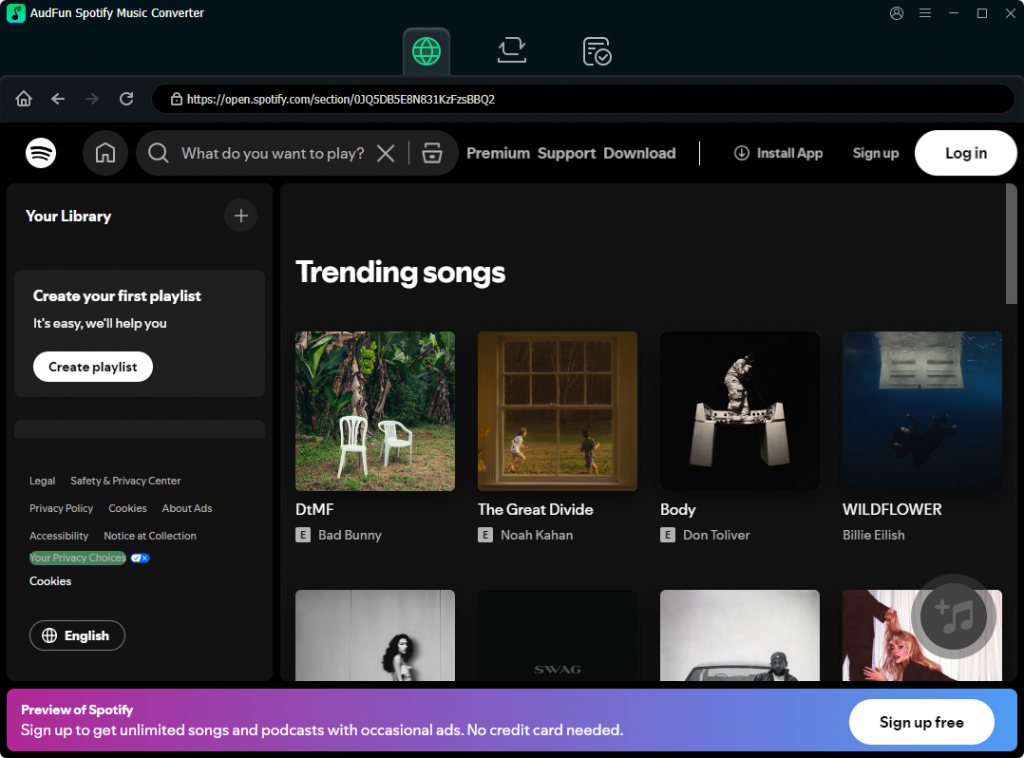
Step 2: Add Spotify Tracks or Playlists to AudFun
Then, you will need to add your Spotify tracks or playlists to the AudFun convert list. Just click on the songs and hit the + button in the bottom-right corener. Click on the Add to List button to add your playlist to the convert list.
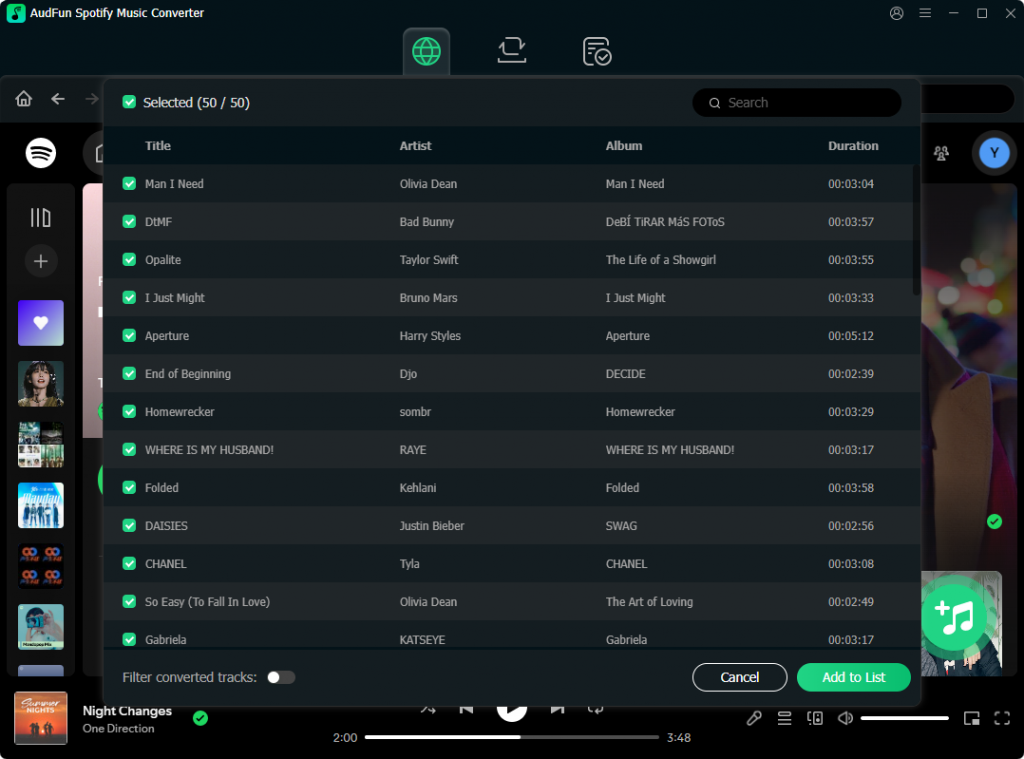
Step 3: Configure the Output Format to AIFF
This is the most critical step. By default, the software might be set to MP3. We need to change that.
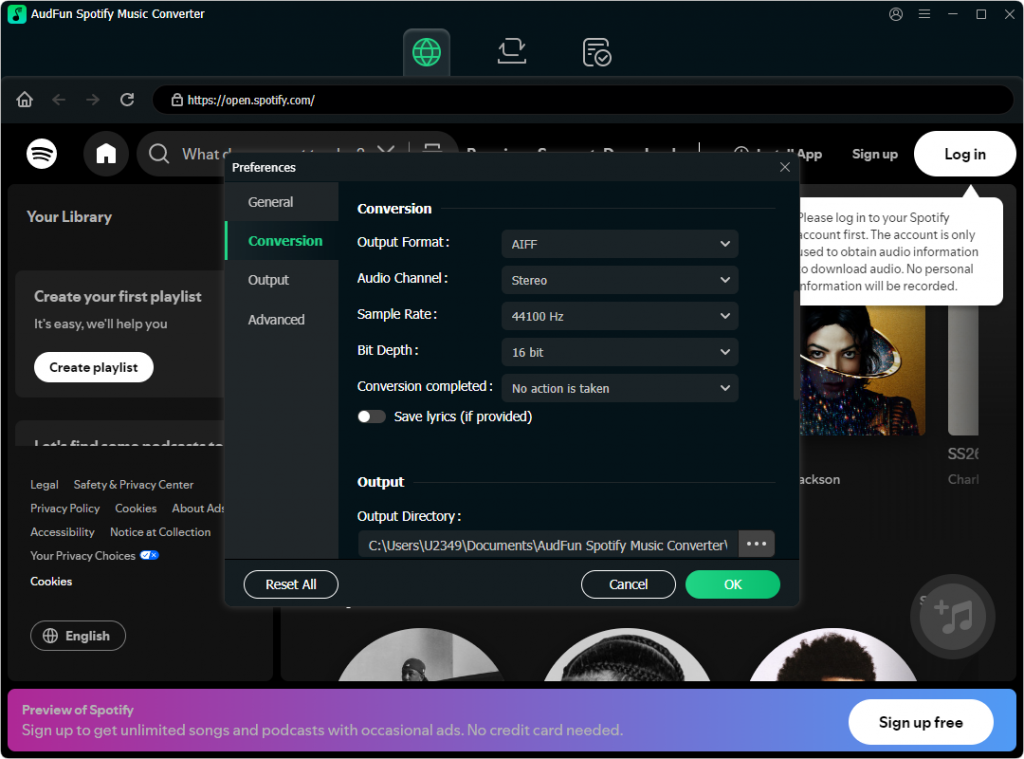
- Navigate to the top-right menu (usually represented by three horizontal lines) and select Preferences.
- Click on the Convert tab in the pop-up window.
- Click the drop-down menu next to Format and select AIFF.
- Geek Tip: To ensure you are getting the best possible translation from Spotify’s Ogg Vorbis, set the Sample Rate to 44100 Hz or 48000 Hz.
- Click OK to save your settings.
Step 4: Initiate the Conversion Process
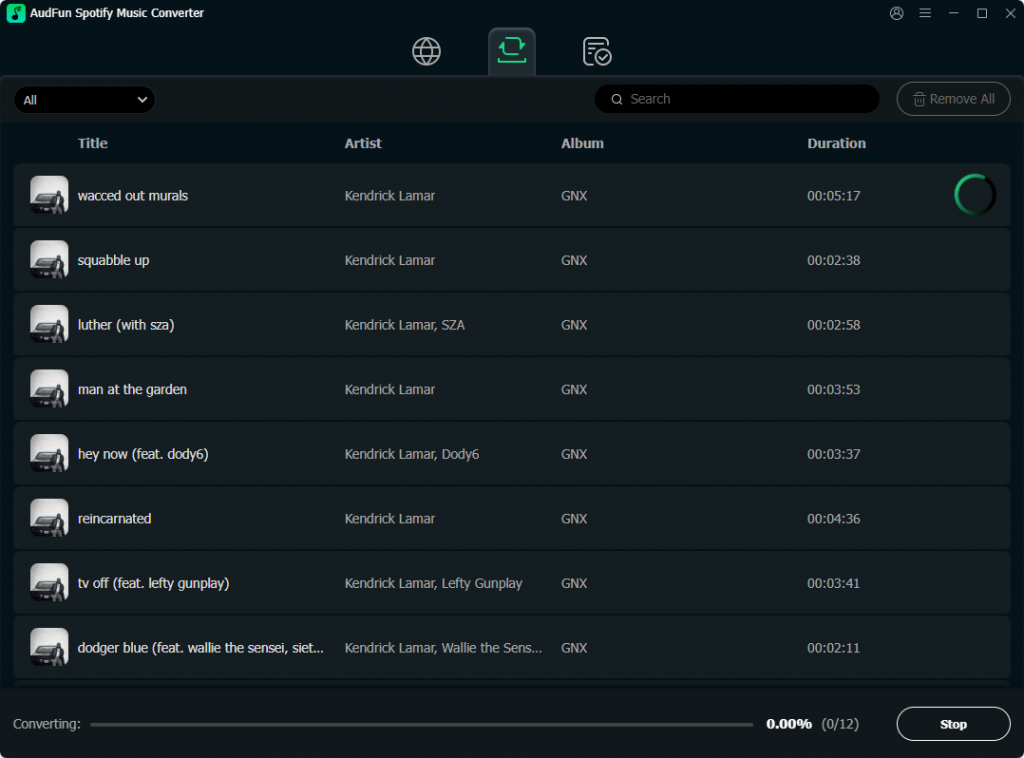
With your tracks loaded and your audio parameters dialed in, look to the bottom right corner of the AudFun interface. Click the large Convert button.
AudFun will now begin bypassing the platform encryption and downloading the tracks directly to your local drive as pristine AIFF files. Thanks to the batch conversion technology, a standard 15-song album usually takes just a few minutes.
Step 5: Locate Your AIFF Files
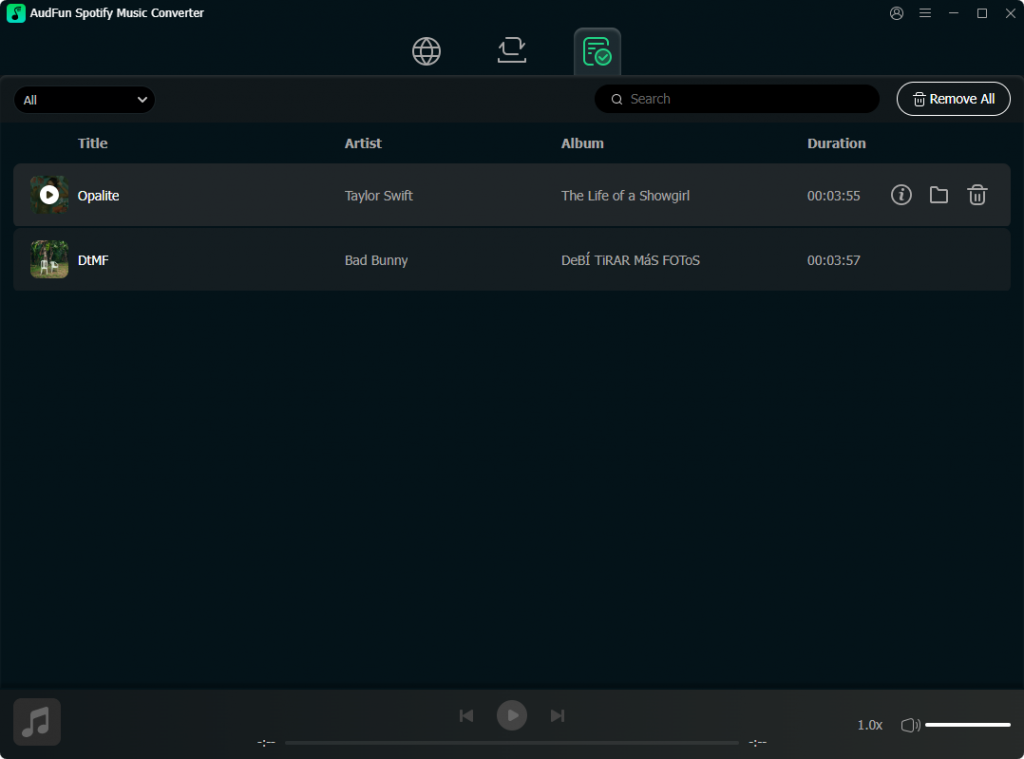
Once the conversion is complete, click on the Converted icon (which looks like a file folder or a clock history icon) at the bottom of the screen. This will open the local destination folder on your computer where all your new, metadata-rich AIFF files are safely stored. You can now drag them directly into your DJ software, Logic Pro, or Apple Music library.
Part 4. Alternative Methods to Download Spotify to AIFF
If you prefer not to use a dedicated downloader like AudFun, the only other viable alternative is using Audio Recording Software like Audacity.
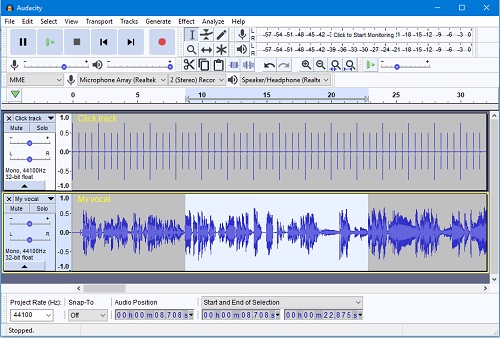
While the tool is powerful, it comes with significant drawbacks for this specific use case:
- 1:1 Real-Time Recording: If a playlist is 4 hours long, it will take exactly 4 hours to record it. There is no high-speed batch conversion.
- Quality Loss: Recording routes the audio through your computer’s soundcard. System sounds (like email ping notifications) can accidentally be recorded over your track.
- Manual Metadata Tagging: Audio recorders just capture sound. They do not capture ID3 tags. You will have to manually type in the artist name, track title, and add album art for every single song.
For a one-off 30-second sample, Audacity is fine. But for building a high-quality local music library, a dedicated tool like AudFun is vastly superior.
Frequently Asked Questions (FAQs)
1. Will converting Spotify to AIFF improve the original audio quality?
No. It is a common misconception that converting to an uncompressed format magically upgrades the audio. Spotify’s maximum output is 320kbps. Converting to AIFF will not restore data that never existed. However, converting to AIFF prevents any further compression loss that would happen if you converted it to another MP3, and it gives you a format preferred by professional audio software.
2. Can I convert Spotify to AIFF using a Free Spotify account?
Yes. Tools like AudFun Spotify Music Converter are designed to work with both Free and Premium accounts. The software successfully extracts the audio stream and filters out the ad interruptions, leaving you with clean, continuous music files.
3. Why are my AIFF files taking up so much hard drive space?
Because AIFF is an uncompressed format, the file sizes are significantly larger than MP3s or Ogg Vorbis files. A standard 4-minute song in 320kbps MP3 format might be around 10MB, whereas the same song in AIFF format will be roughly 40MB to 50MB. Ensure you have adequate local storage before doing massive batch conversions.
Conclusion
Breaking free from streaming platform restrictions doesn’t have to be a headache. Whether you are prepping a setlist for your next DJ gig or archiving tracks for offline, uncompressed playback, converting Spotify music to AIFF is the smartest way to retain audio integrity and crucial metadata. While manual recording tools exist, utilizing a specialized extractor like AudFun Spotify Music Converter is undeniably the most efficient, high-quality method available. It saves hours of manual tagging and real-time recording, letting you focus on what actually matters: enjoying and mixing your music on your own terms.