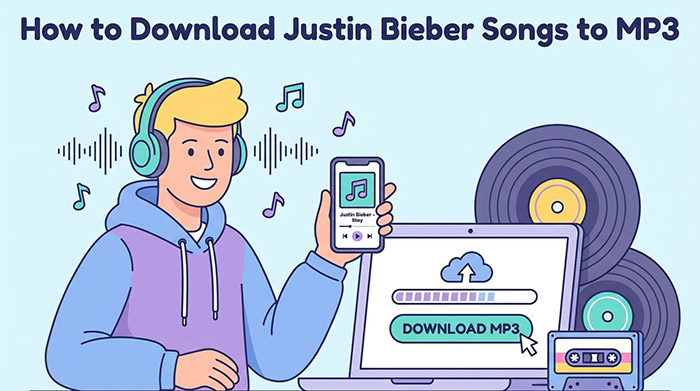
From the early days of “Baby” to the chart-topping success of “Peaches” and the emotional depth of “Ghost,” Justin Bieber has provided the soundtrack to millions of lives. Whether you are hitting the gym, going on a long road trip, or simply relaxing at home, having his music ready to play is a must for any Belieber.
While streaming services dominate the modern music landscape, many fans still prefer to own their music files. If you are looking for the best way to download Justin Bieber songs to MP3, you have likely encountered a maze of confusing software, subscription models, and potentially unsafe websites.
In this comprehensive guide, we will explore the safest, highest-quality, and most reliable methods to get Justin Bieber’s hits into MP3 format, ensuring you can enjoy his music anywhere, anytime, on any device.
- Why Download Justin Bieber Songs in MP3 Format?
- Method 1: Purchasing High-Quality MP3s (The Official & Safest Way)
- Method 2: Using Audio Converters for Personal Playlists
- Method 3: Offline Listening via Streaming Apps
- How to Ensure the Best Audio Quality for Your MP3s
- The Hidden Dangers of “Free MP3 Download” Websites
- Frequently Asked Questions (FAQs)
Why Download Justin Bieber Songs in MP3 Format?
Before diving into the “how,” it is important to understand why the MP3 format remains incredibly popular despite the rise of streaming giants like Spotify and Apple Music.
- Universal Compatibility: Unlike encrypted streaming files, an MP3 file can be played on almost anything—from your smartphone and laptop to older MP3 players, smart TVs, and your car’s stereo system via a USB drive.
- True Offline Listening: While streaming apps offer “offline modes,” you lose access to those downloads the moment your subscription expires. An MP3 file is yours to keep forever.
- No Data Drain: Playing MP3 files locally means you will never have to worry about cellular data caps or buffering issues when you are in an area with poor internet reception.
- Customization: Having the raw MP3 file allows you to create custom ringtones, edit the tracks for dance routines, or mix them into your own DJ sets.
Method 1: Purchasing High-Quality MP3s (The Official & Safest Way)
If you want the absolute best way to download Justin Bieber songs to MP3, purchasing digital tracks from official storefronts is the gold standard. This method guarantees pristine audio quality, directly supports the artist, and is 100% legal and safe from malware.
1. Amazon Music Store
Amazon remains one of the best platforms for purchasing MP3s.
- How to do it: Simply go to the Amazon website, navigate to the “Digital Music” section, and search for “Justin Bieber.” You can buy individual hit tracks like “Sorry” or “Love Yourself,” or purchase entire albums like Justice or Purpose.
- The Benefit: Once purchased, you can download the MP3 files directly to your computer. From there, you can transfer them to your phone, burn them to a CD, or move them to a USB flash drive.
2. iTunes Store (Apple)
For Apple users, the iTunes Store is the traditional go-to. While Apple Music is a streaming service, the iTunes Store still allows you to buy music outright.
- How to do it: Open the iTunes app (on Windows) or the Apple Music app (on Mac, via the iTunes Store tab). Search for Justin Bieber, purchase the songs, and click the download icon.
- Note on Format: Apple typically downloads files in AAC (.m4a) format, which is actually superior to MP3 in quality. However, if you strictly need an MP3, iTunes has a built-in feature that allows you to convert these purchased AAC files directly into MP3s within the app’s settings.
Method 2: Download Justin Bieber Songs to MP3 via Audio Converters
Many users already use streaming services like Spotify or YouTube Music and want to know how to extract their favorite Justin Bieber playlists into MP3 format for personal hardware use.
This is where audio converters and recorders come in. These software programs can record the audio from streaming platforms and save it as an MP3.
How to Use AudFun Spotify Music Converter to Download Justin Bieber Songs
If your primary music source is Spotify, using a dedicated, specialized tool is often the most efficient route. AudFun Spotify Music Converter is widely regarded as one of the best software solutions for this specific task.
AudFun is designed to convert Spotify songs to MP3 for personal use, allowing you to download Justin Bieber songs, albums, or entire playlists directly to MP3. What makes it stand out is its ability to retain 100% lossless audio quality and keep all original ID3 tags (like album artwork, track numbers, and artist info), ensuring your digital library remains perfectly organized.
AudFun Spotify Music Converter
- Preserves high audio quality output Spotify songs, albums, playlists, etc.
- Supports the conversion of Spotify music files at a high speed of X5 rate
- Listen to Spotify offline without premium on multiple devices and platforms
- Converts Spotify music to several formats like FLAC, M4A, MP3, etc.
Here is a step-by-step guide on how to use it:
Step 1: Download and Install AudFun
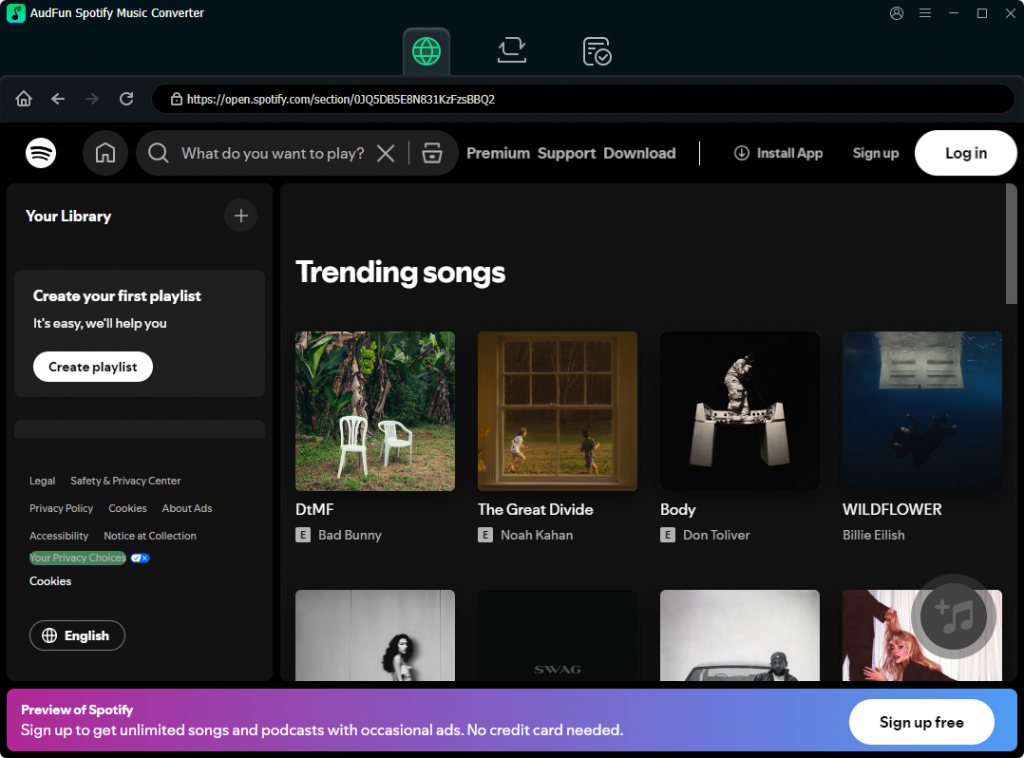
Visit the official AudFun website and download the software for your Mac or Windows PC. Once installed, launch the program. The Spotify app will open automatically alongside it.
Step 2: Add Justin Bieber Songs to AudFun
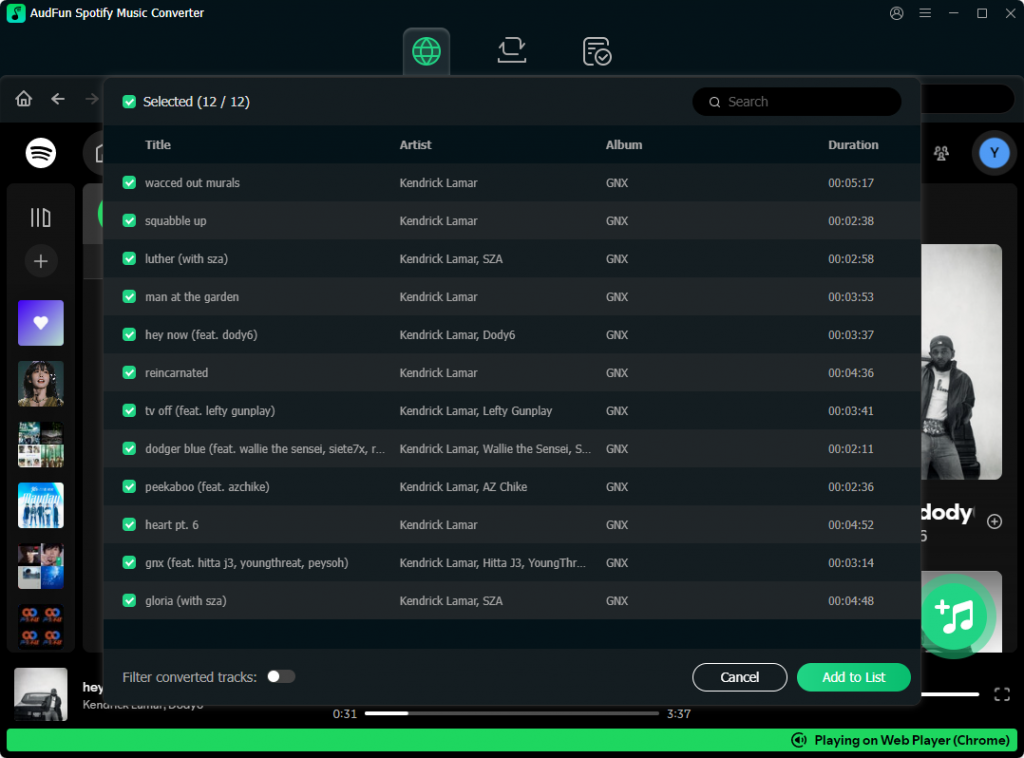
Navigate to your Spotify app and search for the Justin Bieber songs or playlists you want (for example, the Justice album). You can add music to AudFun in two ways:
- Drag and Drop: Simply drag the playlist or song from Spotify and drop it directly into the AudFun interface.
- Copy and Paste URL: Right-click the song/playlist on Spotify, select “Share,” and copy the link. Paste this link into the search bar at the top of the AudFun window and click the “+” button.
Step 3: Set Output Format to MP3 and Adjust Quality
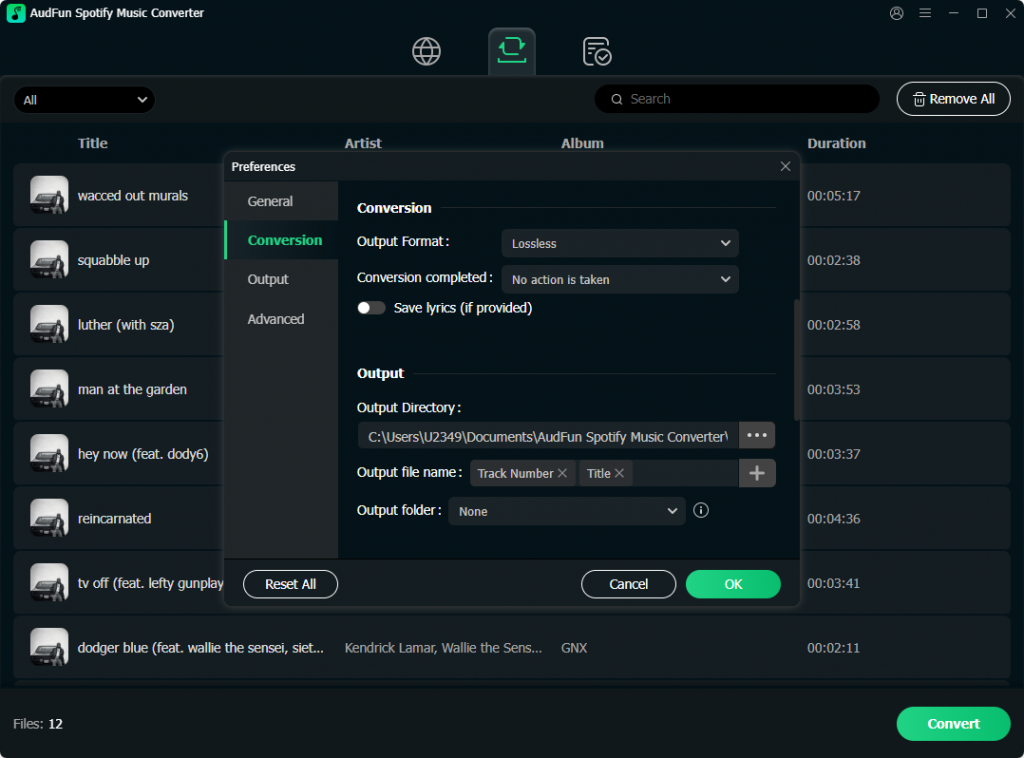
Go to the menu bar in AudFun and select “Preferences,” then click on the “Convert” tab. Here, set the Output Format to MP3. To ensure you get the best listening experience, change the Bit Rate to 320 kbps and the Sample Rate to 48000 Hz.
Step 4: Convert and Download
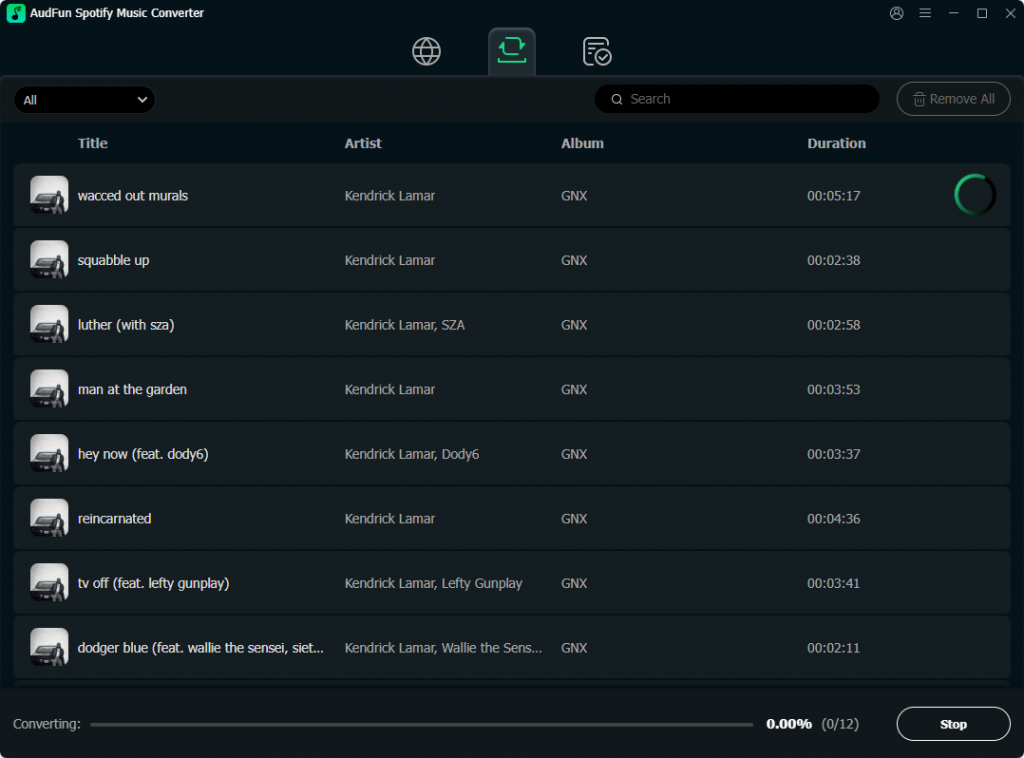
Click the “Convert” button at the bottom right corner of the screen. AudFun will begin downloading the Justin Bieber songs to MP3 at up to 5X speed. Once finished, you can click the “Converted” icon (usually a folder symbol) to locate your new MP3 files on your computer’s local drive.
Method 3: Offline Listening via Streaming Apps
If your primary goal is simply to listen to Justin Bieber without an internet connection, and you don’t strictly need the .mp3 file format for external hardware, utilizing the offline feature of streaming apps is the easiest route.
Platforms like Spotify Premium, Apple Music, and Amazon Music Unlimited allow you to download unlimited songs to your device.
- How to do it: Open your streaming app, search for Justin Bieber, open an album or playlist, and toggle the “Download” button.
- The Catch: These files are encrypted. You cannot get the MP3 file, you cannot share it with a friend, and you cannot play it locally. The music will also disappear if you cancel your monthly subscription.
How to Ensure the Best Audio Quality for Your MP3s
When you download Justin Bieber songs to MP3, not all files are created equal. The quality of an MP3 is determined by its “bitrate,” measured in kilobits per second (kbps).
- 128 kbps: This is considered low quality. The file size is very small, but the music will sound flat, and you will lose the deep bass in tracks like “Intentions” or the crisp acoustic guitar in “Love Yourself.”
- 256 kbps: This is standard high quality, often used by iTunes and standard streaming. It offers a great balance between file size and excellent sound.
- 320 kbps: This is the highest possible quality for an MP3 file. If you are using audio converter software like AudFun or buying digital tracks, always check the settings to ensure you are downloading at 320kbps. This ensures you hear Bieber’s vocals exactly as the studio intended.
The Hidden Dangers of “Free MP3 Download” Websites
In your search for the best way to download Justin Bieber songs to MP3, you will undoubtedly stumble across websites promising free, instant downloads. As an SEO and tech expert, I strongly advise against using these sites.
- Malware and Viruses: These sites are notorious for hiding malicious software inside fake “Download Now” buttons. Clicking them can infect your computer with ransomware or spyware.
- Poor Audio Quality: Even if you successfully download a song, these sites often rip audio at incredibly low bitrates (like 96kbps or 128kbps), resulting in a terrible listening experience.
- Incorrect Metadata: Free downloaded files rarely have the correct album artwork, song titles, or artist tags, leaving your digital music library looking like a disorganized mess.
Frequently Asked Questions (FAQs)
Can I put downloaded Justin Bieber MP3s on a USB drive for my car?
Yes. If you have purchased the MP3s from Amazon or used a personal recording tool like AudFun to generate MP3s, you can simply drag and drop the files from your computer onto a formatted USB drive and plug it into your car’s audio system.
Is it legal to convert YouTube videos of Justin Bieber into MP3s?
Downloading copyrighted music videos from YouTube violates YouTube’s Terms of Service. While recording audio for personal, private use falls into a legal gray area in some jurisdictions, distributing or selling those files is strictly illegal. Always prioritize official purchasing channels.
Why won’t my downloaded Spotify songs play on my old MP3 player?
Spotify downloads are not MP3 files but encrypted OGG Vorbis files. They can only be read by the Spotify app. To play music on a traditional MP3 player, you must use a converter tool to extract them to MP3 or purchase the actual MP3 files from a digital storefront.
Conclusion
Finding the best way to download Justin Bieber songs to MP3 ultimately depends on your specific needs. If you want the highest quality, safest experience, purchasing digital tracks through Amazon or iTunes is undoubtedly the best route.
If you are looking to convert Spotify playlists for personal use, reliable software like the AudFun Spotify Music Converter provides a high-quality solution. Finally, upgrading to a premium subscription offers a great offline listening experience, even if it doesn’t provide raw MP3 files.