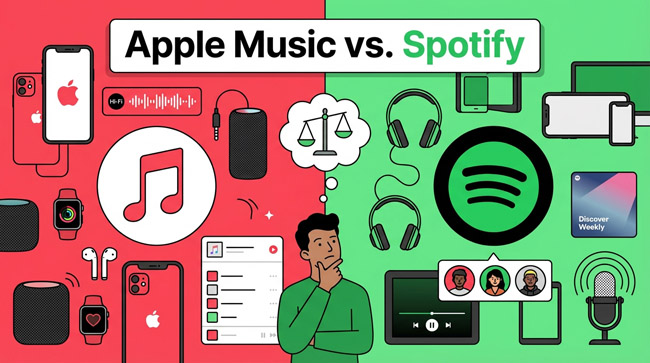
Choosing between Apple Music vs. Spotify used to be a simple question of whether you owned an iPhone or an Android. Today, the battle is far more nuanced. With both platforms boasting catalogs of over 100 million songs and pricing that mirrors each other closely, the decision now hinges on specific lifestyle needs: Do you value high-fidelity audio, or do you crave social sharing features? Do you want a human touch in your playlists, or do you trust an algorithm to know your soul?
In this detailed comparison, we break down every critical aspect—from audio quality and user interface to pricing and music discovery—to help you decide which streaming service deserves your monthly subscription.
- The Quick Verdict: Who Is Each Service For?
- 1. Price and Plans: The “Free” Factor
- 2. Audio Quality: The Audiophile’s Choice
- 3. Music Discovery: Algorithms vs. Human Curation
- 4. User Experience and Interface
- 5. The Ecosystem: Connect vs. AirPlay
- 6. Artist Payouts: The Ethical Angle
- Comparison Table: Apple Music vs. Spotify
- Bonus Tip: How to Download Spotify Songs to MP3 with AudFun🔥
- Conclusion: Which Should You Subscribe To?
The Quick Verdict: Who Is Each Service For?
Before we dive deep, here is the “cheat sheet” if you are in a rush.
- Choose Spotify if: You love discovering new music through algorithms, you enjoy sharing your listening habits socially (hello, Spotify Wrapped), or you want a robust free plan to test the waters. It is also the better choice if you listen to a lot of podcasts and want them in the same app as your music.
- Choose Apple Music if: You are an audiophile who cares about Lossless Audio and Spatial Audio, you are deeply integrated into the Apple ecosystem (HomePod, Apple TV, Apple Watch), or you prefer human-curated radio over algorithmic suggestions.
1. Price and Plans: The “Free” Factor
When analyzing Apple Music vs. Spotify pricing, the biggest differentiator is immediately visible: the free tier.
The Free Tier Advantage
Spotify is arguably the king of the “freemium” model. You can access its entire catalog without paying a dime, provided you can tolerate advertisements, lower audio quality, and shuffle-only playback on mobile devices. For students or casual listeners who don’t mind the occasional interruption, this is a massive value proposition that Apple simply does not offer.
Apple Music has no free ad-supported tier. It is a premium-only service, though it does offer a generous trial period (usually one to three months).
Premium Pricing
For paid subscriptions, the playing field is incredibly level. The standard pricing structure for both services is nearly identical:
- Individual Plan: ~$10.99/month (varies by region)
- Student Plan: ~$5.99/month
- Family Plan: ~$16.99/month (Up to 6 accounts)
The Apple One Bundle: Where Apple pulls ahead in value is the Apple One bundle. If you already pay for iCloud storage, Apple TV+, or Apple Arcade, bundling Apple Music into one subscription can save you a significant amount of money compared to paying for Spotify + iCloud separately.
2. Audio Quality: The Audiophile’s Choice
This is where the debate of Apple Music vs. Spotify gets technical—and where Apple currently dominates.
Apple Music: Lossless and Spatial Audio
Apple Music has made Lossless Audio and Spatial Audio (Dolby Atmos) standard features for all subscribers at no extra cost.
- Lossless: Apple streams up to 24-bit/192kHz. This means you are hearing the music exactly as the artist created it in the studio, without the compression artifacts found in standard streaming.
- Spatial Audio: This feature creates a 360-degree surround sound experience. When listening with compatible headphones (like AirPods Pro or Max), instruments sound like they are placed around you in a 3D space. It is a game-changer for immersion.
Spotify: Still Waiting for HiFi
Spotify currently streams using the Ogg Vorbis format at a maximum bitrate of 320kbps. While this is “Very High” quality and perfectly acceptable for most listeners using standard Bluetooth headphones, it is technically inferior to CD quality. Rumors of a “Spotify HiFi” or “Supremium” tier have circulated for years, but as of now, Apple Music offers superior audio fidelity for the same price. If you have high-end headphones or a quality home stereo system, the difference is noticeable.
3. Music Discovery: Algorithms vs. Human Curation
How do you find your next favorite song? Your answer to this will largely dictate your preference.
Spotify: The Algorithmic King
Spotify’s greatest weapon is its algorithm. Features like Discover Weekly and Release Radar are uncannily accurate at predicting what you will like based on your listening history.
- AI DJ: A newer feature that acts like a personalized radio host, introducing songs and explaining why they were picked for you.
- Daylist: A hyper-specific playlist that changes multiple times a day based on your vibe (e.g., “90s Grunge for a Rainy Tuesday Afternoon”).
Spotify feels like it “knows” you. It excels at keeping the music playing endlessly without you ever needing to hit skip.
Apple Music: The Human Touch
Apple takes a “tastemaker” approach. While it has algorithmic playlists (like the New Music Mix), its strength lies in human curation.
- Apple Music 1: A 24/7 global radio station hosted by real DJs like Zane Lowe. It features exclusive interviews and premieres that give the platform a “live” culture feel.
- Editorial Playlists: Apple’s genre playlists feel more like they were crafted by music experts rather than a computer code.
4. User Experience and Interface
Spotify: Dark, Social, and Busy
Spotify’s interface is famously dark-mode only. It is designed to be cool, vibrant, and social.
- Social Features: You can see what your friends are listening to in real-time (on desktop), create Collaborative Playlists, and use the Jam feature to let everyone at a party control the queue.
- Podcasts & Audiobooks: Spotify aggressively pushes non-music content. For some, having podcasts and audiobooks in the same app is convenient. For others, it makes the homepage feel cluttered and “messy.”
Apple Music: Clean, Visual, and Focused
Apple Music uses a clean, white interface (which switches to dark mode based on system settings). It is strictly about the music.
- Lyrics View: Apple’s real-time lyrics feature (Apple Music Sing) is visually stunning and superior to Spotify’s, even allowing you to lower the vocal track to do karaoke.
- Library Management: If you are the type of person who likes to organize a digital library of albums rather than just a stream of playlists, Apple Music’s library management is far better. It handles your own uploaded MP3s and iTunes purchases seamlessly alongside streaming tracks.
5. The Ecosystem: Connect vs. AirPlay
How you listen to music around your house matters.
Spotify Connect is arguably the best feature in the streaming world. It allows you to use the Spotify app on your phone as a remote control for Spotify running on any other device (your PS5, your laptop, your smart speaker, your TV). The handoff is seamless and fast.
Apple Music relies on AirPlay 2. While AirPlay is high quality, it is a casting protocol, meaning your phone is doing the work of beaming the audio to the speaker. It drains more battery and isn’t as universally compatible with non-Apple hardware as Spotify Connect. However, if you own a HomePod or Apple TV, the integration is magical, including voice control via Siri.
6. Artist Payouts: The Ethical Angle
For listeners who care about how their subscription fee supports their favorite artists, this is an important distinction.
Data consistently shows that Apple Music pays artists more per stream than Spotify. While the exact numbers fluctuate, Apple Music generally pays roughly double (or more) per stream compared to Spotify. Spotify argues that their larger user base (including free users) generates more total revenue, but on a per-listen basis, Apple is the more artist-friendly platform financially.
Comparison Table: Apple Music vs. Spotify
| Feature | Spotify | Apple Music |
|---|---|---|
| Free Plan | Yes (Ad-supported) | No |
| Audio Quality | Up to 320kbps (Ogg Vorbis) | Lossless (up to 24-bit/192kHz) |
| Spatial Audio | No | Yes (Dolby Atmos) |
| Discovery | Excellent Algorithms (AI DJ) | Human Curation & Radio |
| Podcasts | Integrated in App | Separate App (Apple Podcasts) |
| Social | High (Friend Activity, Wrapped) | Low (Basic Sharing) |
| Web/Desktop | Excellent App & Web Player | Good App (iTunes legacy on Windows) |
| Smart Speakers | Universal (Spotify Connect) | Best on HomePod (AirPlay) |
Bonus Tip: How to Download Spotify Songs to MP3 with AudFun
If you have decided to stick with Spotify but envy the “digital ownership” aspect of Apple Music—or if you simply want to play your Spotify music on an old MP3 player, in your car via USB, or on a device that doesn’t support the Spotify app—there is a powerful workaround.
AudFun Spotify Music Converter is a specialized tool designed to download and convert Spotify tracks, playlists, and podcasts into plain audio formats like MP3, FLAC, and WAV. This allows you to keep your music forever, even if you cancel your subscription, and listen completely offline without the Spotify app limitations.
Here is a step-by-step guide on how to use it.
Step 1: Install and Launch AudFun
First, download and install the correct version of AudFun Spotify Music Converter for your computer (Mac or Windows).
- Once installed, launch the AudFun program.
- The Spotify desktop app will automatically open in the background (make sure you are logged in).
Step 2: Add Spotify Songs or Playlists
You can import music into AudFun in two simple ways:
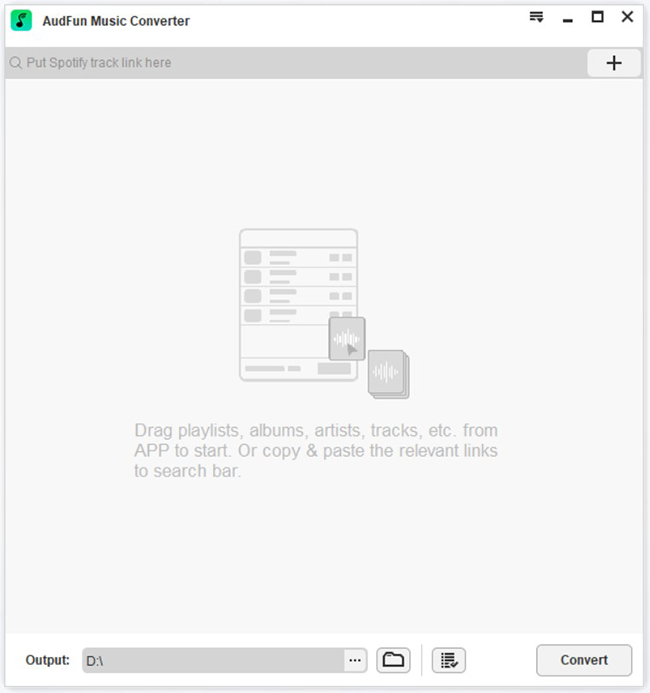
- Drag and Drop: Simply drag a song, album, or playlist directly from the Spotify app interface and drop it into the main window of AudFun.
- Copy URL: In Spotify, click the “…” (three dots) next to a song or playlist, select Share > Copy Song Link. Paste this link into the address bar at the top of the AudFun interface and click the “+” button.
Step 3: Customize Your Output Settings
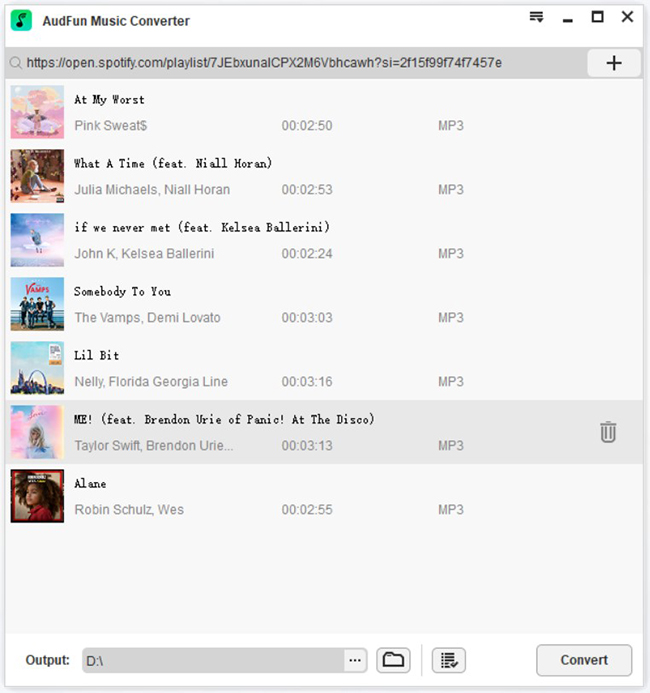
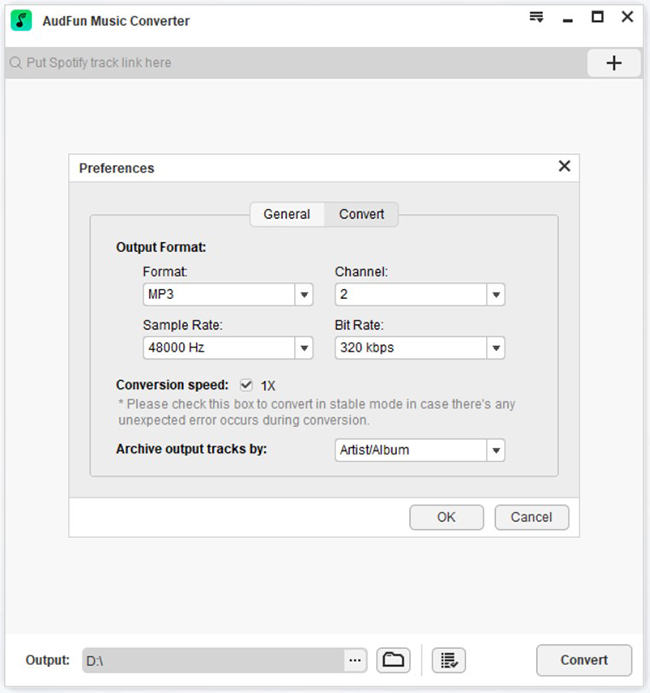
Before converting, you can choose the audio quality to match your needs (e.g., MP3 for compatibility or FLAC for higher quality).
- Windows: Go to the Menu bar > Preferences > Convert.
- Mac: Click “AudFun Spotify Music Converter” in the system menu bar > Preferences > Convert.
- Here, you can change the Format (MP3, FLAC, WAV, M4A), Bit Rate (up to 320kbps), and Sample Rate.
Step 4: Start the Conversion
Once your songs are added and settings are adjusted:
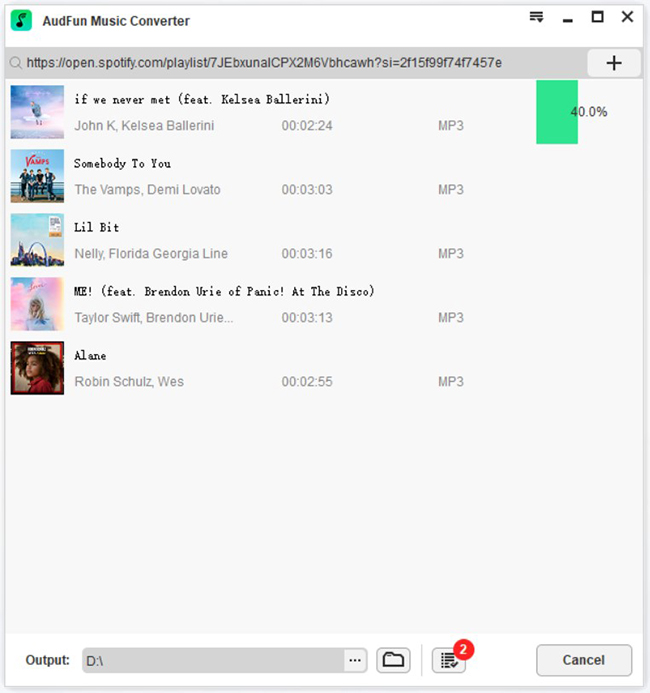
- Click the large Convert button at the bottom-right corner.
- AudFun will begin downloading the tracks at up to 5X speed.
- Once finished, click the “History” icon (paper with a clock) to locate your newly converted, offline files on your computer.
You can now transfer these files to any device—your phone, MP3 player, DJ software, or USB drive—and enjoy your Spotify music without limits.
Conclusion: Which Should You Subscribe To?
The choice between Spotify and Apple Music depends on your priorities. Select Spotify for superior algorithms and social features, or choose Apple Music for high-fidelity audio and Apple ecosystem integration. Since both offer free trials, testing them is the best way to decide. For permanent offline access to Spotify tracks, consider trying AudFun Spotify Music Converter.