Spotify has evolved far beyond being just a music streaming giant. With its aggressive expansion into podcasts and now audiobooks, it has become a one-stop shop for all audio entertainment. Whether you are looking to catch up on the latest bestsellers or dive into classic literature, knowing how to listen to audiobooks on Spotify is essential for maximizing your experience on the platform.
However, Spotify’s audiobook system can be confusing. Unlike music, not all audiobooks are free to stream, and different rules apply to Free and Premium users. This guide will walk you through everything you need to know about the Spotify audiobook catalog, how to access it, how to purchase titles directly, and the best ways to listen offline—including a special method to keep your audiobooks forever.
- Part 1. Does Spotify Have Audiobooks and How Do They Work?
- Part 2. How to Listen to Audiobooks on Spotify for Free Users
- Part 3. How to Listen to Audiobooks on Spotify for Paid Users
- Part 4. How to Listen to Spotify Audiobooks without Network Connection🔥
- Part 5. FAQs About Audiobooks on Spotify
- Part 6. Conclusion
Part 1. Does Spotify Have Audiobooks and How Do They Work?
Yes, Spotify now boasts a massive library of over 375,000 audiobook titles. But before you play, it is crucial to understand that Spotify treats audiobooks differently than music or podcasts.
When you search for an audiobook, you will see a Play button or a Lock icon. This depends on your subscription status and the specific title. Spotify’s audiobook model is a hybrid of streaming (for Premium subscribers) and one-time purchasing (for everyone).
Part 2. How to Listen to Audiobooks on Spotify for Free Users
If you are a Spotify Free user, you might think you are completely locked out of audiobooks. While you don’t get the “all-you-can-eat” access that Premium users enjoy, there are still two distinct ways you can listen.
Method 1: Listen to Audiobooks on Spotify via Podcast
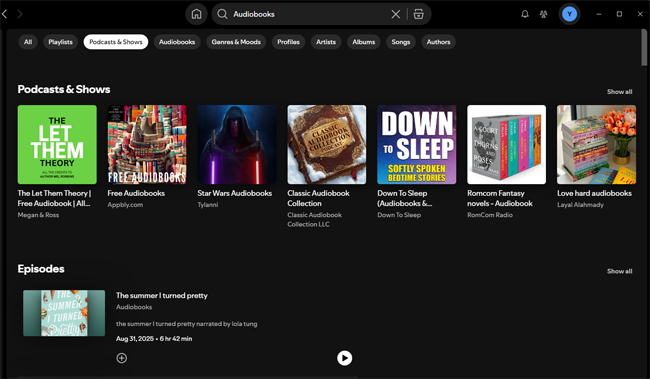
Many classic books (like Pride and Prejudice or Sherlock Holmes) are in the public domain. Creators often upload these as Podcasts rather than official “Audiobooks.” Since podcasts are free for everyone on Spotify, you can listen to these narrated classics without paying a dime.
How to find free audiobooks on Spotify: Search for specific titles followed by “audiobook” or browse playlists like “Audiobooks Public Domain.”
Pros: Completely free; works on the free account.
Cons: Limited to older classics; quality varies by narrator; technically categorized as podcasts.
Part 3. How to Listen to Audiobooks on Spotify for Paid Users
For Spotify Premium subscribers (Individual, Family, and Duo plan managers), the experience is much more seamless. Spotify offers a unique “freemium” model for audiobooks that is integrated directly into your subscription.
3.1 Listen to Audiobooks on Spotify via Searching Directly
Finding audiobooks is straightforward. Spotify has created a dedicated hub for spoken-word content.
Step 1. Open the Spotify app on your mobile or desktop.
Step 2. Tap on the Search tab.
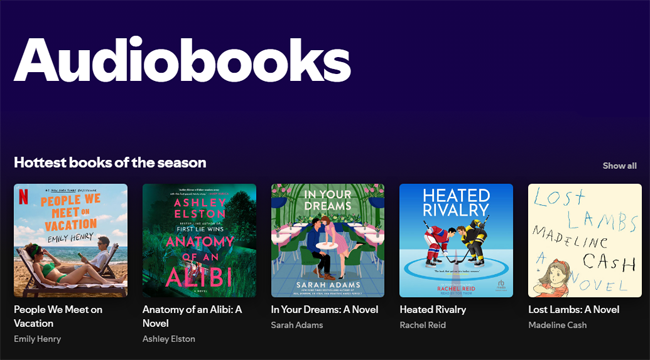
Step 3. Select the Audiobooks tile to browse by genre or curated lists.
Step 4. Alternatively, type the book title in the search bar. Look for the result tagged as “Audiobook.”
3.2 Listen to Audiobooks on Spotify via Buying
Even Premium users may need to buy books. This happens in two scenarios:
- The book is not in the Premium catalog: Some new releases are purchase-only.
- You ran out of listening time: If you exhaust your monthly allowance (see below), you can buy the book to finish it or purchase a 10-hour “top-up.”
How to Buy Audiobooks on Spotify
For most users worldwide, you must use a web browser to complete the purchase. However, the purchasing process can be tricky because Spotify does not always allow you to buy books inside the mobile app (to avoid fees from Apple and Google).
Step 1. On your computer or smartphone, navigate to the Spotify Web Player or open.spotify.com.
Step 2. Sign into your Spotify account.
Step 3. Use the search bar to find the audiobook you wish to buy.
Step 4. Click on the audiobook cover to open its details page.
Step 5. You will see a green Buy button and the price (e.g., “$11.99”). Click this button.
Step 6. Enter your credit card or payment details securely in the browser window.
Step 7. Once the payment is confirmed, the audiobook will automatically unlock in your Spotify account. You can now listen to it anytime, ad-free.

Note for US Users: Spotify has recently started rolling out in-app purchasing for users in the United States. If you are in the US, you may see the price and a “Buy” button directly in the app. For everyone else, or if you don’t see the button, stick to the web browser method described above.
3.3 Listen to Audiobooks on Spotify via Premium 15 Hours Free Listening
This is the core benefit for Premium subscribers in eligible markets (US, UK, Australia, etc.).
- The Allowance: You get 15 hours of audiobook listening time per month at no extra cost.
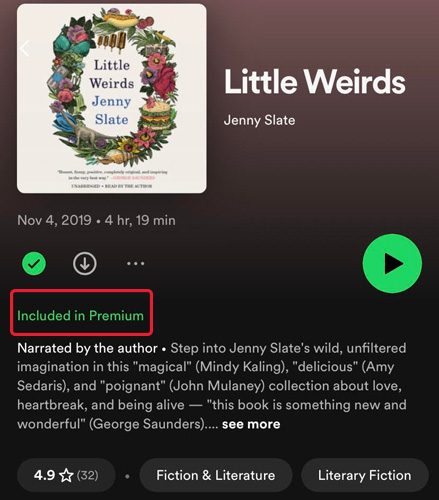
- The Selection: This applies to the “Included in Premium” catalog (marked with a green “Play” button).
- How it works: As you listen, your time counts down. This is great for shorter books or trying out a story before committing to buying it.
- Reset: Your 15 hours reset monthly, but unused hours do not rollover.
Part 4. How to Listen to Spotify Audiobooks without Network Connection
Streaming audiobooks consumes data. Whether you are on a flight or commuting underground, offline listening is essential.
4.1 Download Audiobooks from Spotify Official
If you are a Premium subscriber or have purchased an audiobook, downloading is simple. You can download the Audiobooks to your modile device from the app directly.
Step 1. Go to the audiobook page.
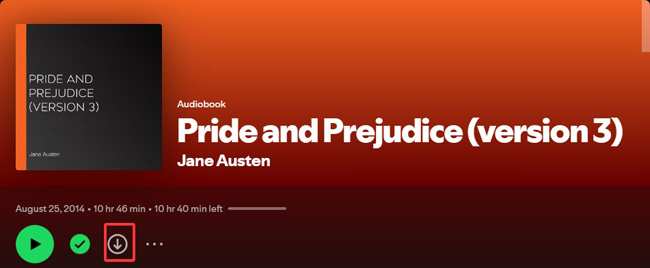
Step 2. Tap the Download arrow icon (circle with a downward arrow).
Step 3. Once the arrow turns green, the content is saved to your device.
Step 4. Enable “Offline Mode” in settings to ensure you aren’t using data.
Limitation: These downloads are encrypted cache files. You can only play them within the Spotify app, and if your Premium subscription expires (and you haven’t bought the book), you lose access to the “Included” titles.
4.2 Download Audiobooks from Spotify via AudFun Spotify Converter
What if you want to listen to your Spotify audiobooks on an MP3 player, burn them to a CD for your car, or simply keep a backup in case you cancel your subscription? This is where a specialized tool like the AudFun Spotify Music Converter comes in.
AudFun is a powerful third-party tool designed to download and convert Spotify songs, playlists, podcasts, and audiobooks into common formats like MP3, FLAC, or WAV. It removes the DRM protection, allowing you to truly own the files.
Why Choose AudFun Audiobook Converter for Spotify
- Convert audiobooks to MP3, AAC, WAV, etc.
- Retains original audio quality and ID3 tags (Title, Artist, Cover)
- Downloads at up to 5X speed
- Listen to Audiobooks on any device without the Spotify app
The following steps will show you how to download and listent to audiobooks on Spotify offline.
Step 1. Launch AudFun and Add Audiobooks
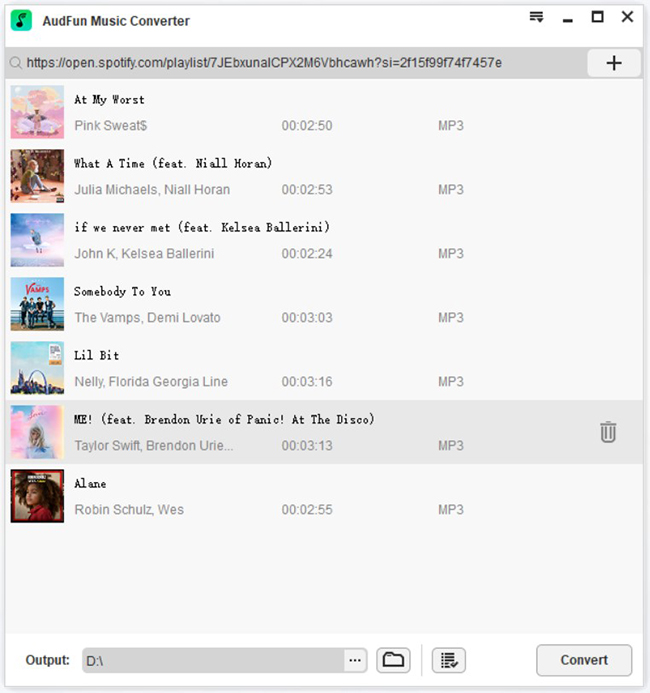
Open AudFun Spotify Music Converter on your computer. The Spotify app will launch automatically. Find the audiobook you want to download on Spotify. Drag and drop the audiobook (or specific chapters) directly into the AudFun interface. Alternatively, copy the audiobook link and paste it into the search bar in AudFun, then click the + button.
Step 2. Configure Output Settings
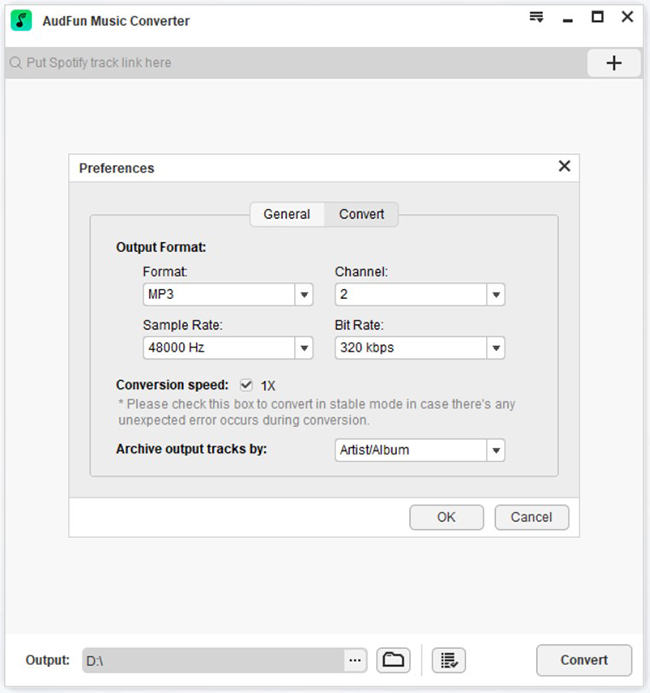
Click the Menu bar in the top right corner and select Preferences. Switch to the Convert tab. Here, you can set the output format to MP3 (recommended for broad compatibility). You can also adjust the bit rate and sample rate for better quality.
Step 3. Convert and Listen to Audiobooks on Spotify Offline
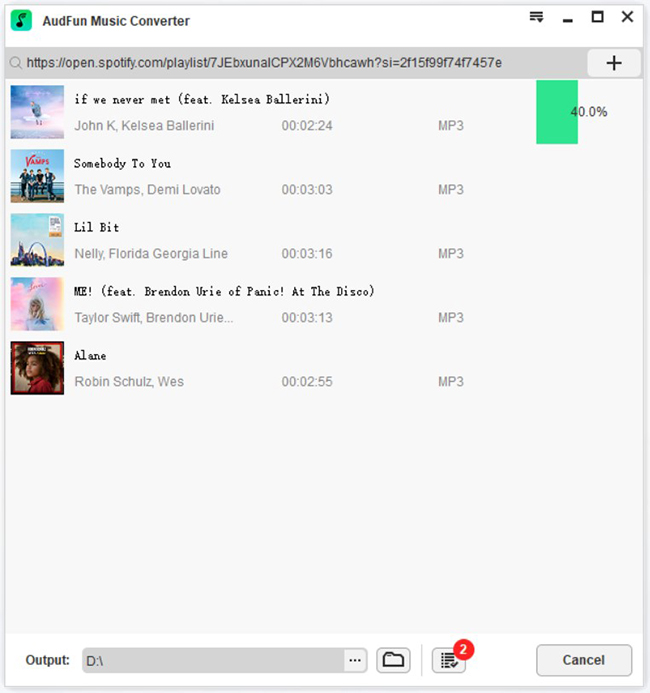
Click the large Convert button at the bottom right. AudFun will begin downloading the audiobooks from Spotify and converting them to your computer’s local drive. Once finished, you can locate the files in the “Converted” history folder and transfer them to any device for offline listening without restrictions.
Part 5. FAQs About Audiobooks on Spotify
Q1: Is the 15-hour limit for each audiobook or total?
The 15-hour limit is a total monthly allowance. If you listen to a 10-hour book, you have 5 hours left for the month. It is not per book.
Q2: Can I share my audiobook hours with my Family Plan?
No. Currently, the 15 hours of listening time is only available to the plan manager (the primary account holder) of Family and Duo plans. Sub-accounts do not get their own 15-hour allocation.
Q3: Do I lose my purchased audiobooks if I cancel Premium? No.
If you purchase an audiobook with a one-time payment, it is yours forever. You can listen to it on a Spotify Free account. However, you will lose access to the “15 hours free” streaming catalog.
Q4: Why are some chapters locked even though I have Premium?
If you see a lock, it means either you have used up your monthly 15 hours, or that specific title is not included in the Premium subscription catalog and must be purchased separately.
Part 6. Conclusion
Spotify has successfully transformed into a comprehensive audio hub, making it easier than ever to enjoy music and audiobooks on the go. Whether you are a free or paid user, there is a method for everyone.
For those who want complete control over their library, tools like AudFun Spotify Converter bridge the gap between streaming convenience and offline ownership, ensuring your favorite stories are always available—even without a subscription or internet connection. Now that you know how to listen to audiobooks on Spotify, pick a title and start listening today!