
Key Takeaways
- The Verdict on DumpMedia: DumpMedia is a solid, functional tool for converting Spotify’s proprietary format into universal MP3 files, retaining decent audio quality and metadata. However, some users report occasional crash issues and a slightly outdated interface.
- The Best Alternative: AudFun Spotify Music Converter emerges as the superior alternative, offering a more stable conversion engine, flawless 320kbps lossless quality retention, and a highly intuitive user experience.
- Core Capability: Both tools allow you to bypass format restrictions, enabling offline playback on MP3 players, smartwatches, and DJ software without requiring a Spotify Premium subscription.
- Quick Recommendation: If you want the most seamless, crash-free batch conversion experience with perfect ID3 tag preservation, skipping straight to AudFun is highly recommended.
- Part 1. Why Spotify’s Format is Frustrating
- Part 2. DumpMedia Spotify Music Converter: An Honest Review
- Part 3. Meet the Best Alternative: AudFun Spotify Music Converter
- Part 4. Head-to-Head Comparison: DumpMedia vs. AudFun
- Part 5. FAQs About DumpMedia Spotify Music Converter
Part 1. Why Spotify’s Format is Frustrating
If you are a music lover, you already know the drill. You spend hours curating the perfect Spotify playlist. You even pay for Premium to download it for offline listening. But the moment you try to transfer those tracks to your Garmin smartwatch, an old-school MP3 player, or USB drive for your car stereo, you hit a brick wall.
Spotify encodes its audio in a proprietary OGG Vorbis format. This strict encryption prevents you from playing your downloaded cache files anywhere outside the official Spotify app. Furthermore, if your Premium subscription expires, your offline library vanishes.
This is exactly where a dedicated format converter steps in. A good converter doesn’t just record audio; it seamlessly decodes the restricted stream and repackages it into universal formats like MP3, FLAC, or WAV, all while keeping the original sound quality intact. Today, we are looking at one of the popular tools on the market—DumpMedia Spotify Music Converter—and exploring why you might want to consider its top rival instead.
Part 2. DumpMedia Spotify Music Converter: An Honest Review
DumpMedia has been around for a while and has built a reputation as a reliable utility for audio extraction. It operates by analyzing the Spotify web player or desktop app and converting the tracks locally on your machine.
Standout Features of DumpMedia
- Format Flexibility: It supports exporting to popular formats including MP3, M4A, WAV, and FLAC. This covers 99% of hardware playback needs.
- Decent Speed: DumpMedia claims to operate at up to 5X conversion speed, allowing you to process batch conversions of entire albums relatively quickly.
- Metadata Preservation: A major headache with generic audio recorders is ending up with files named “Track_01.mp3”. DumpMedia successfully retains basic ID3 tags like title, artist, album, and artwork.
Where DumpMedia Falls Short (Pros & Cons)
No software is perfect, and to give you a fair assessment, here is the breakdown:
Pros:
- Works for both Spotify Free and Premium accounts.
- Straightforward drag-and-drop mechanics.
- Retains customized audio parameters (sample rate, bit rate).
Cons:
- Stability Issues: Users occasionally report that the software hangs or crashes during massive batch conversions (e.g., playlists with 500+ songs).
- Interface: The UI feels a bit dated compared to modern macOS and Windows 11 aesthetics.
- Customer Support: Response times for troubleshooting can sometimes be sluggish.
Part 3. Meet the Best Alternative: AudFun Spotify Music Converter
While DumpMedia gets the job done, technology moves fast. If you are looking for a more robust, modern, and highly stable solution, AudFun Spotify Music Converter is currently the best alternative on the market.
AudFun is built with a highly optimized conversion core. It feels like a tool designed by audio geeks, for audio geeks, but with an interface so clean that anyone can use it.
AudFun Spotify Music Converter
- Preserves high audio quality output Spotify songs, albums, playlists, etc.
- Supports the conversion of Spotify music files at a high speed of X5 rate
- Listen to Spotify offline without premium on multiple devices and platforms
- Converts Spotify music to several formats like FLAC, M4A, MP3, etc.
Why AudFun Takes the Crown
- True Lossless Quality Output: AudFun guarantees 100% original audio quality preservation. If you are streaming at 320kbps, AudFun delivers a crisp, rich 320kbps MP3 file. There is no muffled background noise or artificial compression.
- Rock-Solid Stability at 5X Speed: Whether you are converting a 10-track EP or a massive 1,000-song Lo-Fi playlist, AudFun’s engine handles batch conversion effortlessly without freezing your computer.
- Advanced ID3 Tagging & Organization: AudFun doesn’t just keep tags; it organizes them. You can set the software to automatically sort your converted files into folders by Artist or Album, saving you hours of manual file management.
- Sleek, Modern UI: The user interface is highly intuitive, making the workflow incredibly smooth from the moment you launch the app.
How to Convert Spotify to MP3 Using AudFun
Using AudFun is incredibly straightforward. Here is a quick step-by-step guide to liberating your music library:
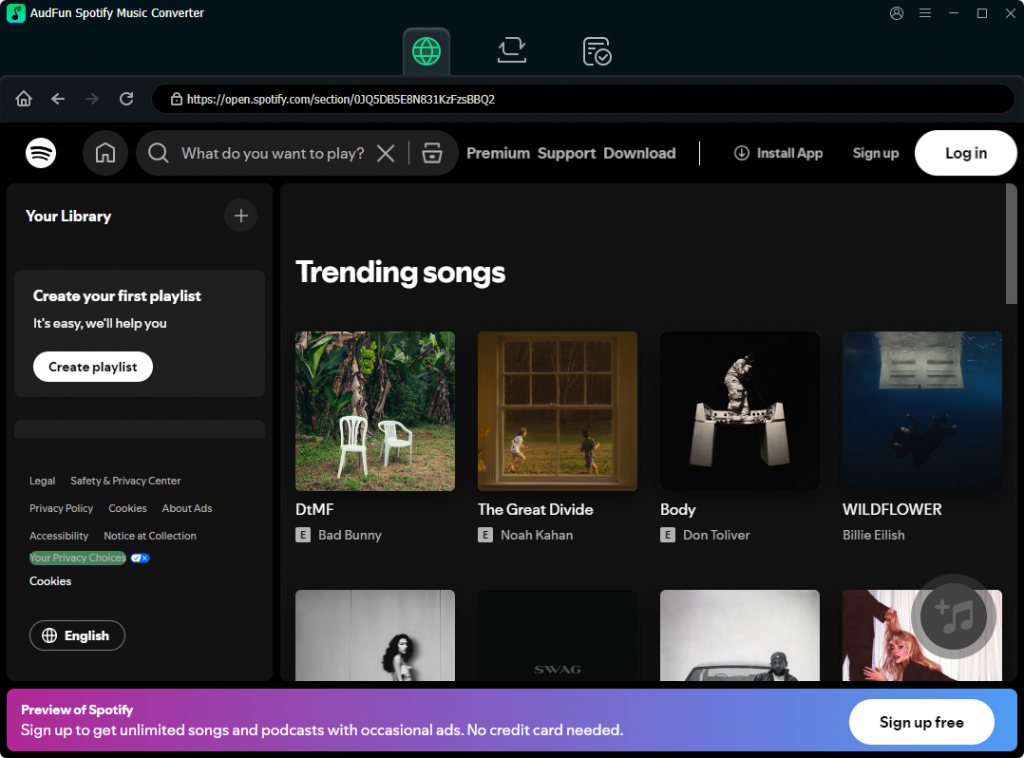
Step 1: Download and Launch AudFun
Install AudFun Spotify Music Converter on your Mac or PC. When you launch the program, you will need to log into your Spotify account to download songs.
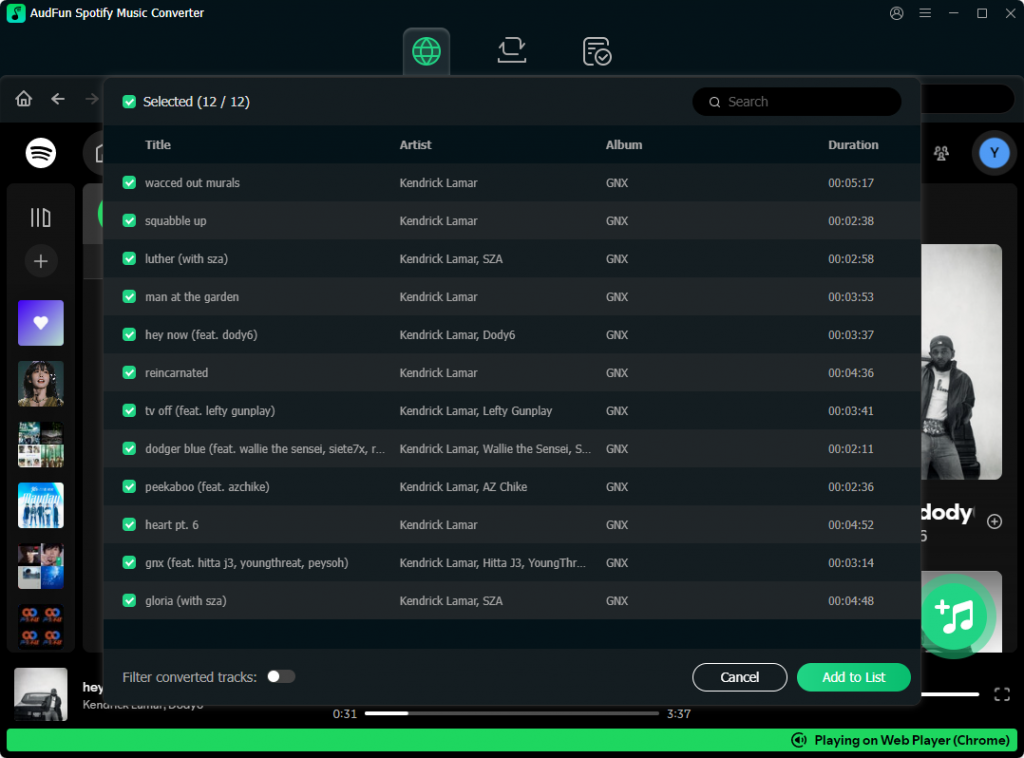
Step 2: Add Your Favorite Spotify Tracks
Find the playlist, album, or track you want to convert in Spotify. You can either drag and drop the music directly into the AudFun interface, or copy the Spotify URL and paste it into AudFun’s search bar, then click the “+” (Add) button.
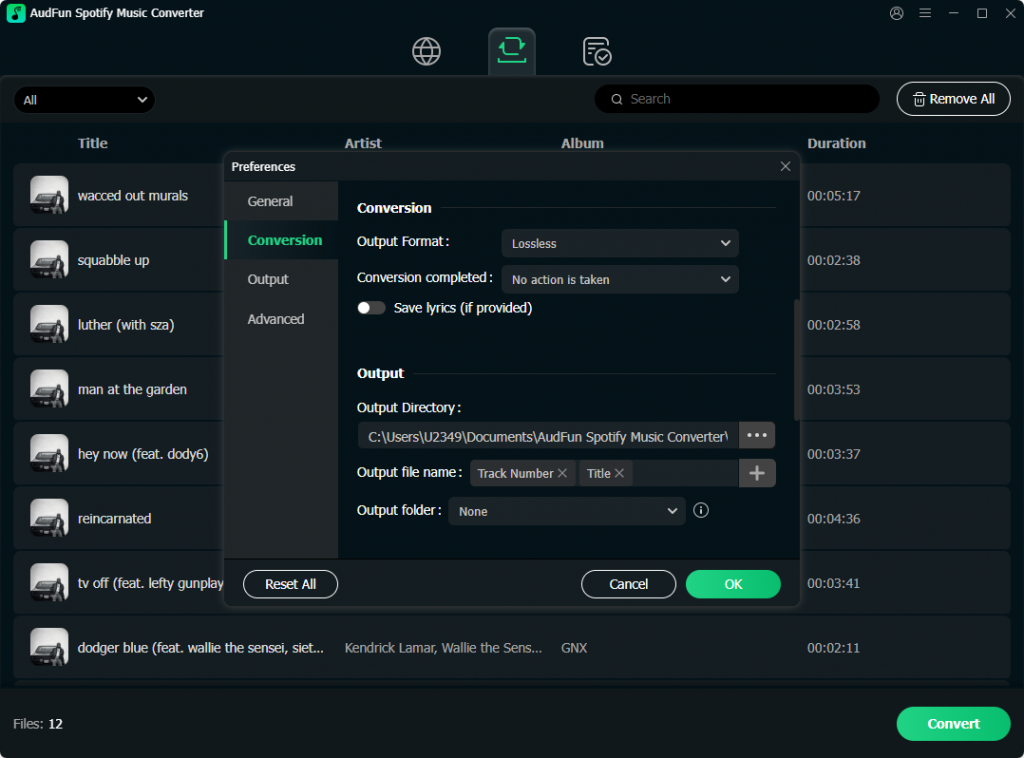
Step 3: Customize Output Settings
Click the menu icon (usually three lines) in the top right corner and select Preferences, then navigate to the Convert tab. Here, you can select your desired output format (MP3, FLAC, WAV, AAC, M4A, M4B). For the best balance of quality and file size, select MP3, set the Bit Rate to 320 kbps, and Sample Rate to 48000 Hz.
Step 4: Start the Conversion
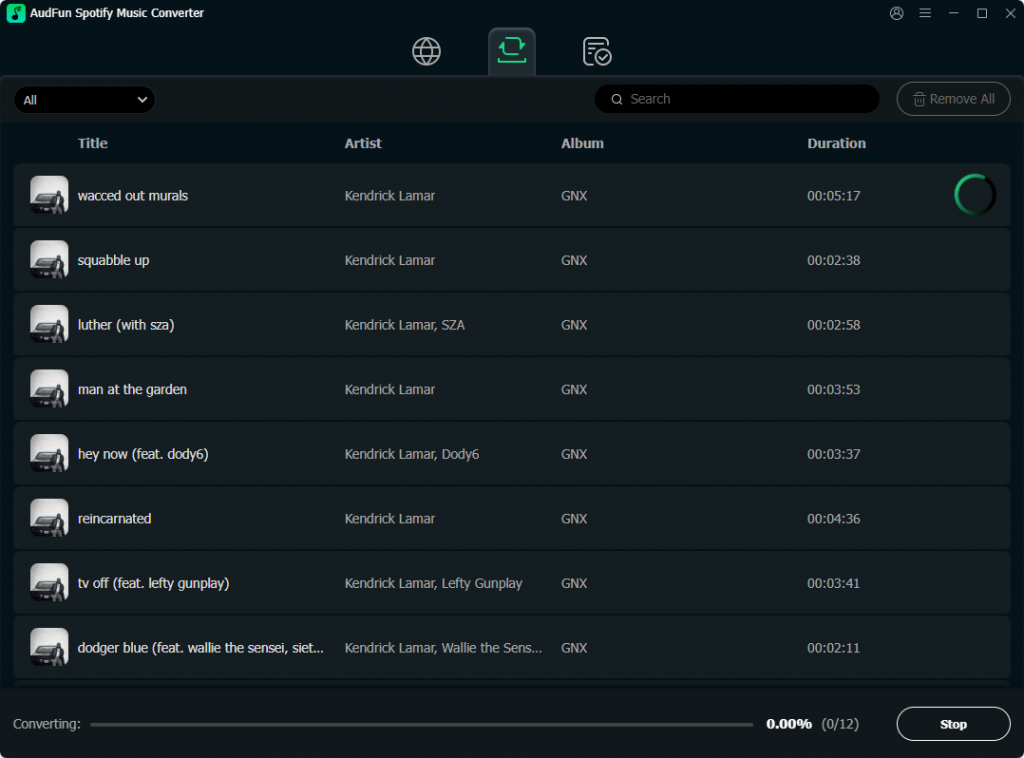
Once your settings are dialed in, simply hit the “Convert” button at the bottom right. AudFun will instantly begin unlocking the format restrictions and downloading the tracks at up to 5X speed. Once finished, click the Converted (folder) icon to locate your shiny new, restriction-free MP3 files.
Part 4. Head-to-Head Comparison: DumpMedia vs. AudFun
To make your decision easier, here is a quick technical breakdown:
| Feature | DumpMedia Spotify Music Converter | AudFun Spotify Music Converter |
|---|---|---|
| Output Formats | MP3, M4A, WAV, FLAC | MP3, FLAC, WAV, AAC, M4A, M4B |
| Max Audio Quality | 320kbps | 320kbps (True Lossless Engine) |
| Conversion Speed | Up to 5X | Up to 5X (Highly Stable) |
| ID3 Tag Preservation | Yes | Yes (Plus Auto-Folder Organization) |
| UI & Experience | Functional but dated | Modern, clean, and intuitive |
| Batch Processing | Good (occasional crashes) | Excellent (rock-solid stability) |
Part 5. FAQs About DumpMedia Spotify Music Converter
1. Do I need a Spotify Premium subscription to use these converters?
No, you do not. Both DumpMedia and AudFun work perfectly with a free Spotify account. The software captures the audio stream directly, bypassing the ad interruptions and format restrictions, allowing free users to enjoy premium-like offline playback.
2. Are these converted files safe to use on any device?
Absolutely. Once the tracks are converted into standard formats like MP3 or FLAC, they are entirely free of playback limits. You can safely transfer them to USB drives, SD cards, smartwatches, MP3 players, or import them into video editing and DJ software without any compatibility issues.
3. Why is AudFun considered a better alternative to DumpMedia?
While both achieve the same end goal, AudFun offers a more refined user experience. Its conversion engine is significantly more stable when handling massive playlists, it offers a wider array of output formats (like AAC and M4B for audiobooks), and its automatic file organization by Artist/Album saves users a massive amount of manual sorting time.
Conclusion
Breaking free from Spotify’s rigid format restrictions shouldn’t require a degree in computer science. While DumpMedia Spotify Music Converter is a capable tool that has served many users well, it falls slightly behind modern standards in terms of interface design and heavy-load stability.
If you want a flawless, crash-free experience with pristine 320kbps lossless quality and perfect ID3 tag management, AudFun Spotify Music Converter is undoubtedly the best alternative on the market today. It empowers you to truly own your offline music library, ensuring your favorite tracks are always ready to play on any device, anywhere, anytime.