Quick Answer
- Streaming platforms impose format limitations, making offline playback unreliable across borders or in crowded stadiums.
- To control your tournament audio, convert encrypted streams into universal, DRM-free formats like MP3 or FLAC.
- Preserving ID3 tags and 320kbps quality is essential for the ultimate tailgate experience.
- Using a dedicated desktop converter ensures your football anthems are permanently saved and ready for any device without an internet connection.
The 2026 FIFA World Cup across North America promises to be a historic event. Whether you are driving to a cross-country tailgate or flying between host cities, official anthems and fan-made mixes will be the heartbeat of your journey.
However, relying purely on standard streaming apps is risky. Cellular networks around packed stadiums often crash, and international flights mean zero connectivity. Furthermore, crossing borders triggers expensive data roaming charges, making streaming financially impractical.
To guarantee uninterrupted access, learning how to download World Cup 2026 songs & playlists for true offline listening is essential. This guide breaks down streaming hurdles and shows you the most effective ways to secure your tournament audio for personal use.
- Part 1. Why Downloading World Cup 2026 Songs & Playlists Matters
- Part 2. Key Criteria for How to Download World Cup Songs Effectively
- Part 3. How to Download World Cup 2026 Songs & Playlists with AudFun Spotify Music Converter
- FAQ About Downloading Word Cup 2026 Playlists
Part 1. Format Limitations: Why Figuring Out How to Download World Cup 2026 Songs & Playlists Matters
Tapping the “download” toggle inside a streaming app works for a morning commute, but it falls short for a multi-week international tournament due to playback restrictions and format limitations.
Streaming services do not provide standard audio files. Instead, they cache encrypted data in proprietary formats like Ogg Vorbis or AAC. These files are tethered to your subscription and the app itself. If you travel to a region with geographic restrictions, or if the app forces a logout while you are offline at a stadium, your downloaded library becomes instantly unplayable.
Moreover, these restricted files lack cross-device compatibility. If you want to load a USB drive for a tailgate party, cached streaming files are useless because they cannot be transferred to generic media players. Understanding how to download World Cup 2026 songs & playlists as standard local files guarantees your music stays yours, regardless of network drops.
Part 2. Key Criteria for How to Download World Cup Songs Effectively
Understanding what makes a high-quality audio conversion process is vital, as settling for low-grade audio can ruin a great football anthem. Here are the technical pillars to consider:
Uncompromised Audio Quality
World Cup tracks rely on deep bass and crisp vocals. When converting encrypted streams, the process must retain the original bitrate. For premium streaming tiers, this means capturing audio at 320kbps. Anything lower will sound muddy when played through large tailgate speakers.
Comprehensive Metadata Retention
Tournament playlists often exceed 200 tracks. If your conversion method strips away ID3 tags, you are left with a chaotic folder of unnamed files. A proper workflow ensures the artist, title, album cover, and track number are preserved, keeping your library organized.
Efficient Batch Conversion
Time is of the essence when preparing for a trip. You need a solution that supports batch processing, allowing you to queue up entire playlists in one click. The software should convert dozens of tracks simultaneously in the background without requiring manual intervention.
Part 3. How to Download World Cup 2026 Songs & Playlists with AudFun Spotify Music Converter
To build a permanent local library, AudFun Spotify Music Converter is the premier choice for fans looking to unlock full access to their favorite tracks.
Why AudFun Spotify Music Converter Fits This Workflow
AudFun Spotify Music Converter overcomes platform format limitations by converting encrypted audio streams into universal formats like MP3, FLAC, WAV, and M4A. It operates at 5X speed while maintaining original audio quality, including the 320kbps bitrate.
By using this software, you ensure every piece of metadata is preserved. It provides a seamless bridge between restricted streaming environments and true local ownership.
| Feature / Aspect | Standard App Offline Mode | AudFun Spotify Music Converter |
|---|---|---|
| File Format | Encrypted cache (Ogg Vorbis/AAC) | Universal (MP3, FLAC, WAV, AAC) |
| Device Compatibility | Limited to the specific app | Any device (USB, car stereo, MP3 player) |
| Permanent Access | No (expires if subscription ends) | Yes (permanent local files) |
| Transferability | Locked to a single device | Fully transferable |
| Offline Reliability | Vulnerable to app logouts | 100% reliable offline playback |
AudFun Spotify Music Converter
- Preserves high audio quality output Spotify songs, albums, playlists, etc.
- Supports the conversion of Spotify music files at a high speed of X5 rate
- Listen to Spotify offline without premium on multiple devices and platforms
- Converts Spotify music to several formats like FLAC, M4A, MP3, etc.
Step-by-Step Tutorial
Here is the complete guide on how to use AudFun Spotify Music Converter to prepare your audio for the tournament.
Step 1: Install and Launch AudFun Spotify Music Converter
Download and install AudFun Spotify Music Converter for Windows or Mac. Launching the application automatically triggers your desktop streaming app, ensuring a synchronized connection.
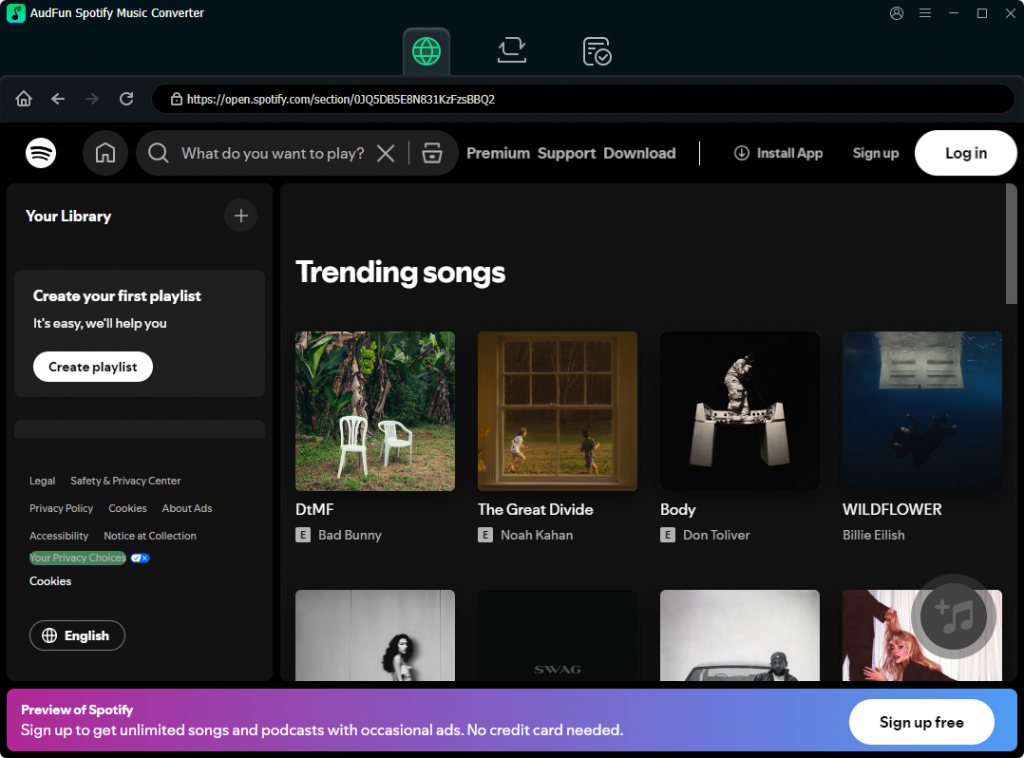
Step 2: Add Your World Cup 2026 Playlists
Locate the World Cup 2026 songs or playlists in your streaming app. Drag and drop the tracks into the AudFun interface, or copy the playlist URL and paste it into the search bar. Click the “+” button to load them.
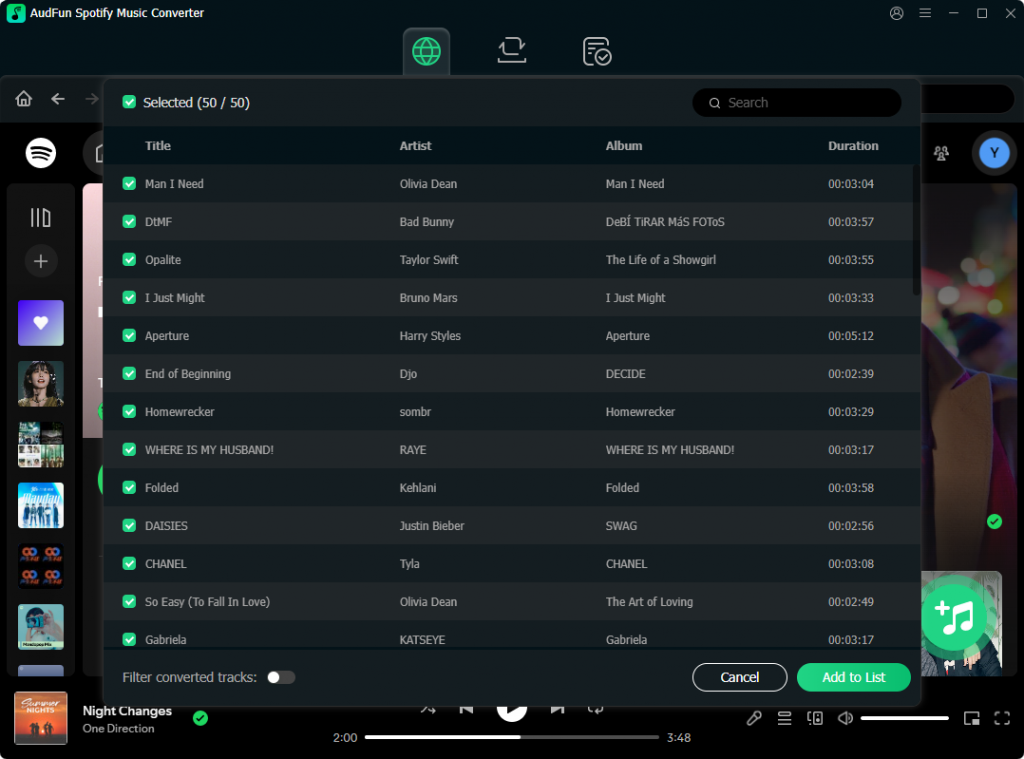
Step 3: Configure Output Format and Quality
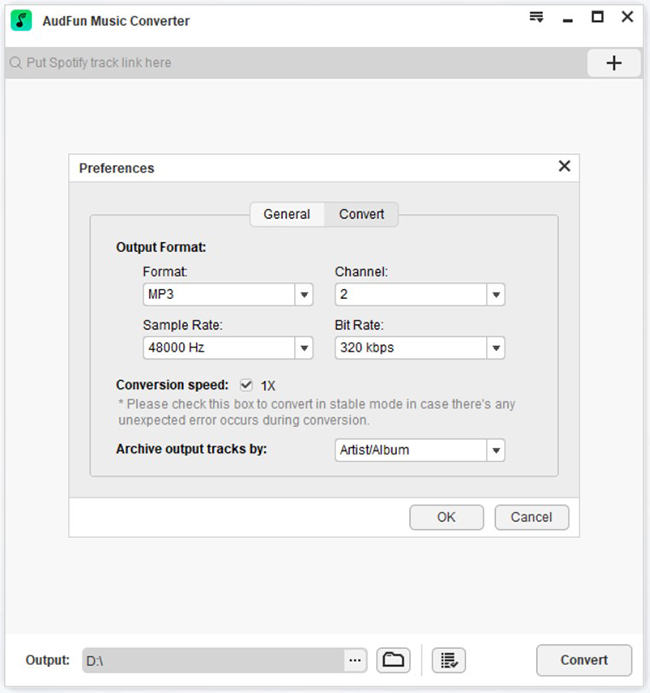
Click the menu icon and select “Preferences.” Navigate to the “Convert” tab to define output parameters. For the best balance of quality and file size, select MP3, set the sample rate to 44.1 kHz, and maximize the bitrate to 320kbps. Click “OK”.
Step 4: Convert for Personal Offline Listening
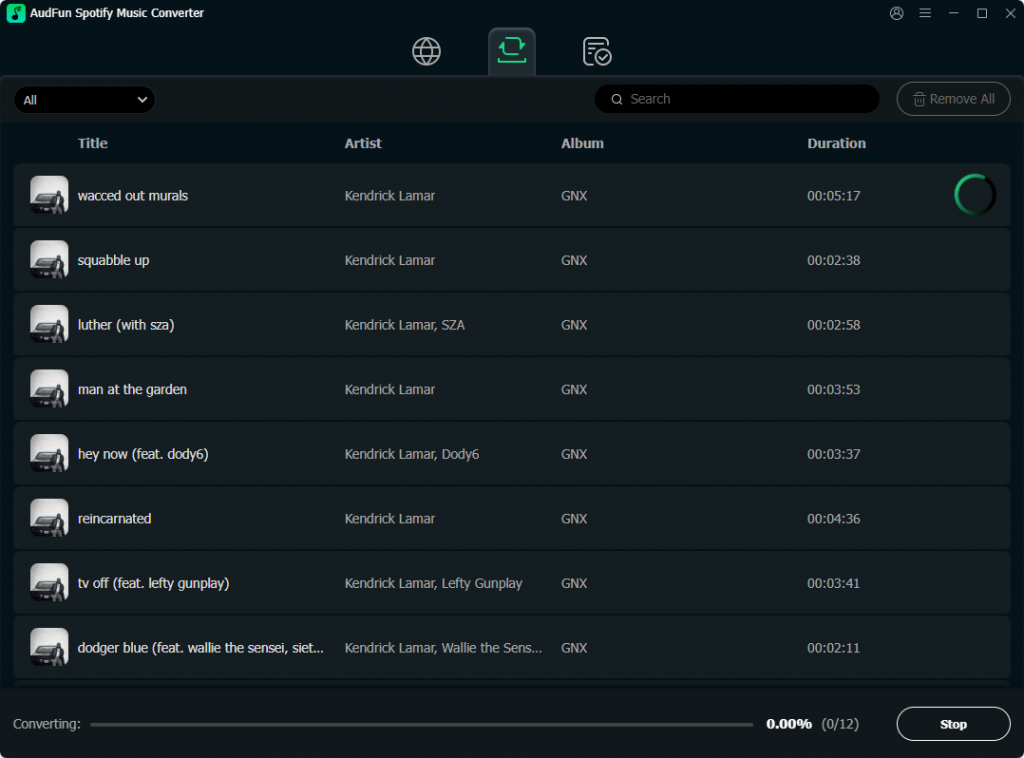
With your settings locked in, click the “Convert” button at the bottom right corner. AudFun will process the playlist, bypassing playback restrictions and saving each track to your local hard drive. Once finished, click the “Converted” icon to locate your DRM-free files.
FAQ About Downloading Word Cup 2026 Playlists
Is it legal to convert streaming songs for personal use?
In most jurisdictions, converting audio streams is acceptable for personal backup. You are creating a copy for private, offline listening. You must comply with local copyright laws and never distribute, sell, or publicly broadcast the files.
Will I lose audio quality when converting to MP3?
Not if configured correctly. Selecting a 320kbps bitrate and 44.1 kHz sample rate makes the MP3 files virtually indistinguishable from the original stream. For zero compression, choose the FLAC format.
Can I batch download massive World Cup 2026 playlists?
Yes. Modern conversion tools handle bulk processing easily. You can load playlists containing hundreds of tracks, and the software will convert them sequentially in the background.
Conclusion
Preparing for the 2026 FIFA World Cup involves curating the perfect travel experience. Having your favorite anthems permanently ready for offline playback ensures the energy stays high, regardless of Wi-Fi drops, roaming fees, or stadium dead zones.
By understanding the format limitations of streaming apps and utilizing the right workflow, you can easily build a permanent audio library. Tools like AudFun Spotify Music Converter make this process seamless, preserving vital metadata and pristine audio fidelity for the ultimate fan experience.
Get your playlists sorted now, load up your USB drives, and get ready to experience the biggest tournament in the world with a soundtrack you truly control.